Improve Your Purchase to Pay - Purchase Order

Optimize Purchase Order Flow in Dynamics 365 for Efficient Procurement
Inefficient purchase order processing often leads to missed deliveries, increased operational costs, and frustrated stakeholders. Our platform helps you identify hidden bottlenecks and deviations throughout your procurement lifecycle. Pinpoint exactly where delays occur, from initial requisition to final receipt, to streamline operations. Uncover opportunities for significant efficiency gains and cost savings.
Download our pre-configured data template and address common challenges to reach your efficiency goals. Follow our six-step improvement plan and consult the Data Template Guide to transform your operations.
Show detailed description
Why Optimize Your Purchase Order Process?
Optimizing your Purchase to Pay, or P2P, Purchase Order process is not merely about achieving minor efficiencies, it is about fundamentally strengthening your entire procurement function. In a complex system like Microsoft Dynamics 365, inefficiencies in Purchase Order management can cascade through your organization, impacting everything from inventory levels and supplier relationships to cash flow and compliance. Slow Purchase Order approvals, frequent rework, and delayed goods receipts translate directly into higher operational costs, missed delivery windows, and potentially strained vendor relationships. Without clear visibility into the actual flow of each Purchase Order, identifying the root causes of these issues becomes a guessing game, making targeted improvements difficult and often ineffective. Understanding the critical role of each Purchase Order from requisition to final receipt is paramount for maintaining a lean, responsive, and cost-effective supply chain.
How Process Mining Unlocks P2P Purchase Order Efficiency
Process mining provides an objective, data-driven approach to understanding the Purchase Order lifecycle within Microsoft Dynamics 365. Instead of relying on assumptions or anecdotal evidence, process mining extracts event log data directly from your system, reconstructing the true, as-is process. For Purchase Orders, this means visualizing every step, from "Purchase Requisition Created" to "Goods Receipt Posted" and "Purchase Order Completed", complete with timestamps and responsible parties. This granular visibility allows you to see the exact paths your Purchase Orders take, uncover deviations from standard operating procedures, and precisely measure the time spent at each stage. You can identify which approval steps cause delays, which departments are involved in rework loops, or whether specific vendors consistently lead to longer cycle times. This powerful analytical capability is key to finding out how to improve Purchase to Pay - Purchase Order performance by shining a light on previously hidden inefficiencies.
Key Areas for Purchase Order Improvement
Applying process mining to your P2P Purchase Order process in Microsoft Dynamics 365 typically reveals several high-impact improvement areas:
- Bottleneck Identification: Pinpoint specific stages or activities where Purchase Orders frequently stall. Is it a particular approval level? A delay in goods inspection? Or perhaps an often-overlooked data entry error? Identifying these bottlenecks is the first step in reducing overall Purchase Order cycle time.
- Rework and Deviation Analysis: Discover how often Purchase Orders are changed, why they are changed, and which changes lead to further delays. Understanding these rework loops can highlight issues with initial requisition accuracy, vendor communication, or internal review processes.
- Compliance and Policy Adherence: Verify that Purchase Orders are following established internal policies and regulatory requirements. Identify instances where Purchase Orders are created without proper requisition, approved out of sequence, or processed by unauthorized personnel, ensuring greater compliance.
- Automation Opportunities: By visualizing manual handoffs and repetitive tasks, you can identify prime candidates for automation, streamlining the flow and freeing up resources for higher-value activities.
- Supplier Performance Insights: Analyze how different suppliers impact your Purchase Order cycle times, from confirmation to goods receipt. This allows for data-backed discussions and negotiations with your vendors.
Expected Outcomes of Optimizing Your P2P Purchase Order
By leveraging process mining for Purchase to Pay - Purchase Order process optimization, you can anticipate significant and measurable benefits:
- Reduced Purchase Order Cycle Time: Achieve faster order processing, from requisition to goods receipt, leading to more agile supply chain operations and better inventory management.
- Cost Savings: Minimize expediting fees, capture early payment discounts, and reduce the manual effort associated with managing delayed or problematic Purchase Orders. This directly contributes to your bottom line.
- Improved Compliance and Reduced Risk: Ensure that all Purchase Orders adhere to internal policies and external regulations, mitigating financial and reputational risks.
- Enhanced Stakeholder Satisfaction: Improve relationships with both internal departments, who receive goods and services more timely, and external suppliers, through more efficient and predictable interactions.
- Data-Driven Decision Making: Move beyond intuition and make informed decisions about process changes, system configurations in Microsoft Dynamics 365, and resource allocation based on concrete evidence.
Getting Started with P2P Purchase Order Optimization
Transforming your Purchase to Pay - Purchase Order process with process mining offers a clear path to greater efficiency and control. By understanding the true flow of your Purchase Orders within Microsoft Dynamics 365, you gain the insights needed to implement targeted improvements that deliver tangible results. Explore how this powerful approach can help you reduce Purchase Order cycle time, eliminate bottlenecks, and achieve robust process optimization across your procurement operations.
The 6-Step Improvement Path for Purchase to Pay - Purchase Order
Download the Data Template
What to do
Access the pre-configured Excel data template designed specifically for Purchase Order analysis in Microsoft Dynamics 365. This template ensures you capture all necessary event log data.
Why it matters
Using the right structure from the start is crucial for accurate analysis. This template streamlines data collection, preventing errors and rework later.
Expected outcome
A ready-to-use Excel template with the correct schema for your Purchase to Pay - Purchase Order data.
Export Your Process Data
What to do
Extract 3-6 months of historical Purchase Order data from Microsoft Dynamics 365. Populate the downloaded template with your real-world event logs and case attributes.
Why it matters
Comprehensive historical data provides a solid foundation for identifying recurring patterns, bottlenecks, and compliance issues within your purchase order process.
Expected outcome
A populated data template containing a significant period of your Purchase to Pay - Purchase Order process history.
Upload Your Dataset
What to do
Securely upload your completed Purchase Order data template to ProcessMind. The system will automatically ingest and prepare your data for analysis.
Why it matters
Seamless data ingestion is vital for starting your analysis quickly. ProcessMind handles the complex data preparation, allowing you to focus on insights.
Expected outcome
Your Purchase to Pay - Purchase Order data successfully uploaded and processed, ready for deep analysis.
Analyze Your Process
What to do
Explore the auto-generated dashboards, process maps, and key performance indicators for your Purchase Order process. Leverage AI-driven recommendations to pinpoint improvement areas.
Why it matters
Visualizing your actual process flow and understanding performance metrics reveals hidden inefficiencies, compliance gaps, and opportunities for cost reduction.
Expected outcome
Clear insights into your Purchase to Pay - Purchase Order process, including bottlenecks, deviations, and data-driven improvement suggestions.
Implement Improvements
What to do
Prioritize the identified improvement opportunities based on their potential impact and feasibility. Develop and execute an action plan to address specific process pain points.
Why it matters
Translating insights into action is where real value is created. Targeted improvements enhance efficiency, reduce cycle times, and ensure better resource utilization.
Expected outcome
Specific changes implemented within your Purchase to Pay - Purchase Order process designed to resolve identified issues and optimize performance.
Monitor Your Process
What to do
Periodically re-upload fresh Purchase Order data from Microsoft Dynamics 365 to ProcessMind. Continuously track key performance indicators to measure the impact of your improvements.
Why it matters
Continuous monitoring ensures that improvements are sustained and that your process remains optimized over time, adapting to new business requirements and challenges.
Expected outcome
Sustained process optimization, measurable KPI improvements, and a proactive approach to maintaining an efficient Purchase to Pay - Purchase Order process.
WHAT YOU WILL GET
Pinpoint P2P Bottlenecks in Your Dynamics 365 Flow
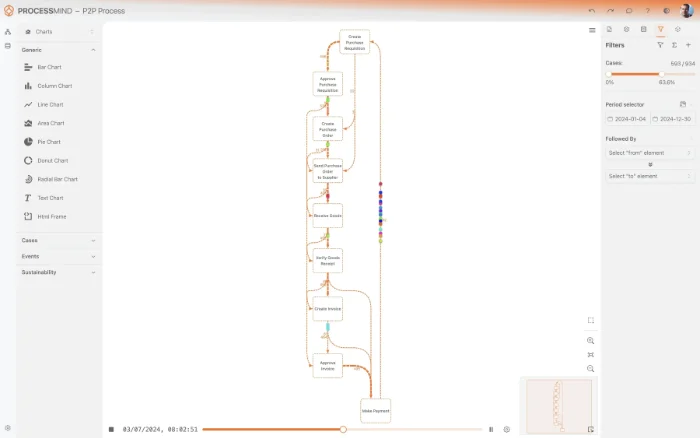
- Map your Purchase Order process end-to-end
- Pinpoint costly delays and rework in POs
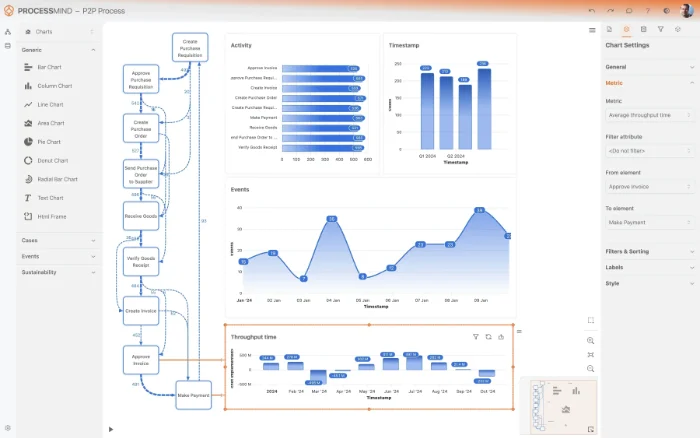
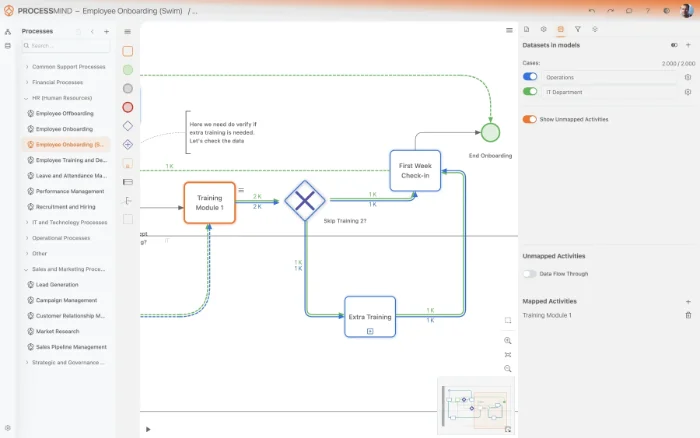
- Compare PO variant performance and deviations
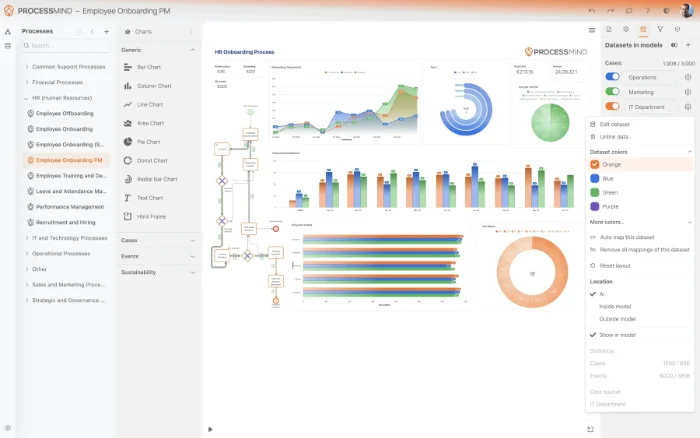
- Monitor key Purchase Order KPIs in real-time
TYPICAL OUTCOMES
Achieving Tangible Results in Purchase Order Processing
These outcomes highlight the significant operational and financial benefits organizations typically achieve by optimizing their Purchase Order process within Microsoft Dynamics 365. Through data-driven insights, businesses can pinpoint bottlenecks and implement targeted improvements to enhance efficiency.
Average reduction in approval time
Streamline your Purchase Order approval process to eliminate bottlenecks and accelerate procurement cycles, ensuring timely order placement.
Decrease in post-approval changes
Identify root causes of Purchase Order changes after approval to reduce rework, administrative overhead, and potential supply chain disruptions.
Increase in policy adherence
Gain visibility into process deviations to ensure Purchase Orders adhere to internal policies and regulatory requirements, minimizing risks and audits.
Reduction in conversion cycle time
Accelerate the conversion of requisitions into Purchase Orders, enabling faster response to demand and improving overall operational agility.
More straight-through processing
Automate manual steps and eliminate exceptions to achieve higher straight-through processing rates, reducing human error and boosting efficiency.
Results vary based on process complexity and data quality. These figures represent typical improvements observed across implementations.
Recommended Data
FAQs
Frequently asked questions
Process mining visualizes the actual flow of your Purchase Order process, revealing hidden bottlenecks and deviations. It highlights areas where approval cycles are slow, modifications are frequent, or manual steps create inefficiencies. This insight allows you to make data-driven decisions for optimization.
You will need event logs related to your Purchase Orders, specifically including a case identifier, an activity, and a timestamp for each step. This data can typically be extracted from tables recording Purchase Order creation, approval, modification, goods receipt, and finalization events within Dynamics 365. These logs form the basis for reconstructing your process.
The first step involves identifying the relevant data sources within Microsoft Dynamics 365 and extracting the necessary event logs. Next, the data is prepared and loaded into a process mining tool. Finally, an initial discovery analysis is performed to visualize your current Purchase Order process.
You can expect to reduce Purchase Order approval times and minimize modification rates. Process mining helps accelerate goods receipt processing, ensure compliance, and expedite requisition-to-PO conversion. Ultimately, it leads to a more efficient and reliable Purchase Order workflow.
Initial insights and a comprehensive process map can often be generated within weeks, depending on data availability and complexity. Actionable improvement recommendations and the implementation of changes can follow shortly thereafter, leading to measurable results within a few months. The timeline is influenced by the scope and your organization's readiness.
Yes, process mining excels at identifying the root causes of these common problems. It can pinpoint specific approval steps that cause delays, reveal patterns of repeated modifications, and show which users or departments are involved in these bottlenecks. This detailed visibility empowers targeted interventions.
While a basic understanding of Dynamics 365 data structures is beneficial, many process mining tools offer connectors or guidance for data extraction. Your internal IT team, or a consultant familiar with Dynamics 365, can typically assist in retrieving the required event logs. The process is designed to be as straightforward as possible.
Boost Your Purchase to Pay - Purchase Order Efficiency Now
Pinpoint inefficiencies and reduce P2P cycle time by up to 30%.
No credit card required, set up in minutes