Improve Your Order to Cash - Sales Order Processing

Optimize Sales Order Processing in Microsoft Dynamics 365
Slow sales order processing often leads to missed targets and unhappy customers. Our platform helps you quickly pinpoint inefficiencies, from initial order creation to final payment receipt. Discover how to streamline your Order to Cash process, ensuring faster fulfillment and improved customer satisfaction.
Download our pre-configured data template and address common challenges to reach your efficiency goals. Follow our six-step improvement plan and consult the Data Template Guide to transform your operations.
Show detailed description
Why Optimize Order to Cash - Sales Order Processing?
The Order to Cash (O2C) process is the lifeblood of any business, directly impacting revenue, customer satisfaction, and cash flow. Within this critical process, Sales Order Processing, particularly in a robust system like Microsoft Dynamics 365, can become surprisingly complex. Delays, inefficiencies, and errors at any stage, from initial order creation to final payment receipt, can ripple through your entire organization.
Ineffective sales order processing leads to significant business challenges. Customers experience longer lead times, incorrect shipments, or delayed responses, eroding trust and potentially leading to lost business. Internally, your teams face increased manual effort, rework, and expedited shipping costs. These inefficiencies can tie up working capital, reduce profitability, and make it difficult to forecast accurately. Understanding and improving Order to Cash - Sales Order Processing is not just about streamlining; it is about ensuring business health, maintaining customer loyalty, and optimizing your financial performance in Microsoft Dynamics 365.
How Process Mining Illuminates Your Sales Order Journey in Microsoft Dynamics 365
Process mining offers a powerful, data-driven approach to understand the actual flow of your sales orders within Microsoft Dynamics 365. Instead of relying on assumptions or documented ideal processes, process mining extracts event log data directly from your D365 system to visually reconstruct every single sales order's journey. This creates an objective, end-to-end view of your Order to Cash - Sales Order Processing process, revealing exactly how activities are performed, by whom, and over what timeframes.
With this powerful analytical capability, you can identify hidden bottlenecks, uncover deviations from standard procedures, and pinpoint where rework or unnecessary steps are occurring. For example, you can see if specific sales orders are taking unusually long between Order Confirmed and Inventory Allocation, or if a high percentage of orders require repeated Credit Check Performed activities. By analyzing these real-world process executions, you gain concrete insights into why your Order to Cash - Sales Order Processing cycle time might be extended or why certain orders face delays, allowing you to focus your process optimization efforts precisely where they are needed most.
Key Areas for Improvement: Unlocking Efficiency
Leveraging process mining for Order to Cash - Sales Order Processing in Microsoft Dynamics 365 uncovers specific opportunities for improvement:
- Order Creation to Confirmation Delays: Identify extended periods between Sales Order Created and Order Confirmed, often pointing to manual review queues, data entry backlogs, or inefficient approval workflows within D365.
- Credit Management Bottlenecks: Analyze the efficiency of Credit Check Performed. Frequent re-checks or significant waiting times can indicate issues with credit policy automation or integration with external systems.
- Fulfillment Efficiency: Pinpoint delays between Inventory Allocation, Goods Picked, Goods Packed, and Goods Shipped. This could reveal logistical problems, warehouse inefficiencies, or insufficient resource allocation impacting your ability to meet Requested Delivery Date and Confirmed Delivery Date targets.
- Invoicing and Payment Cycle: Optimize the handoff from Goods Delivered to Invoice Created and Invoice Sent to Customer. Delays here directly impact Payment Due Date and ultimately, your cash flow, increasing your overall Order to Cash cycle time.
- Process Deviations and Rework: Discover instances where orders deviate from the optimal path, for example, an order being Goods Shipped then returned to Inventory Allocation, indicating errors or exceptions that need to be addressed at their root cause.
Realizing Tangible Outcomes: Benefits of Process Optimization
By focusing on these key areas, organizations can achieve significant, measurable benefits from improving their Order to Cash - Sales Order Processing:
- Reduced Cycle Time: Drastically cut the end-to-end Order to Cash cycle time, from Sales Order Created to Payment Received, leading to faster revenue realization.
- Improved Cash Flow: Accelerate cash conversion by streamlining invoicing and payment processes, enhancing working capital management.
- Enhanced Customer Satisfaction: Ensure faster, more accurate order fulfillment and delivery, building customer loyalty and reducing complaints.
- Lower Operational Costs: Minimize manual rework, reduce the need for expedited shipping, and improve resource utilization across sales, logistics, and finance teams, driving down the cost to serve each sales order.
- Increased Compliance and Reduced Risk: Ensure that all sales order processes adhere to internal policies and external regulations, reducing audit risks and improving data integrity within Microsoft Dynamics 365.
Begin Your Optimization Journey
Understanding and optimizing your Order to Cash - Sales Order Processing in Microsoft Dynamics 365 doesn't have to be a daunting task. With process mining, you gain a clear, evidence-based roadmap to address inefficiencies, eliminate bottlenecks, and significantly improve your operations. This approach empowers you to make informed decisions that drive real business value, irrespective of your prior process mining experience.
The 6-Step Improvement Path for Order to Cash - Sales Order Processing
Download the Template
What to do
Get the Excel template designed for Order to Cash in Microsoft Dynamics 365. This template guides you on structuring your historical data for analysis.
Why it matters
A standardized template ensures your data is correctly formatted, allowing for accurate and consistent process analysis without data preparation errors.
Expected outcome
An Excel template, ready to be populated with your Microsoft Dynamics 365 sales order data.
Export Your Data
What to do
Extract 3-6 months of historical sales order data from Microsoft Dynamics 365. Use standard reporting features to get activities and attributes into the template.
Why it matters
Comprehensive historical data provides a realistic view of your Order to Cash process, revealing recurring patterns and areas ripe for optimization.
Expected outcome
Your Order to Cash sales order data, spanning several months, accurately populated within the provided template.
Upload Your Dataset
What to do
Securely upload the filled Excel template containing your Microsoft Dynamics 365 sales order data to the ProcessMind platform for automated processing.
Why it matters
Swift and secure data ingestion allows the system to begin transforming raw data into actionable process insights quickly, minimizing manual effort.
Expected outcome
Your sales order dataset successfully uploaded and undergoing initial automated analysis by ProcessMind.
Analyze Your Process
What to do
Explore the automatically generated dashboards and process maps, reviewing AI-driven recommendations specific to your Order to Cash process in Dynamics 365.
Why it matters
Visualizing the actual process flow and bottlenecks enables quick identification of inefficiencies, compliance issues, and deviation from the ideal path.
Expected outcome
A clear understanding of your current Order to Cash process performance, identifying key areas for improvement.
Implement Improvements
What to do
Prioritize and act on the identified optimization opportunities, applying insights to refine sales order processing workflows within Microsoft Dynamics 365.
Why it matters
Translating insights into concrete actions directly improves process efficiency, reduces cycle times, and enhances customer satisfaction.
Expected outcome
Specific changes to your Order to Cash process implemented in Dynamics 365, targeting identified inefficiencies.
Monitor Your Process
What to do
Periodically re-upload updated sales order data from Microsoft Dynamics 365 to track the impact of implemented changes and measure KPI improvements.
Why it matters
Continuous monitoring ensures sustained performance gains and allows for agile adjustments, fostering a culture of ongoing process excellence.
Expected outcome
Measurable improvements in key performance indicators for your Order to Cash sales order processing over time.
WHAT YOU WILL GET
Gain Clarity: Optimize Sales Order Processing in D365
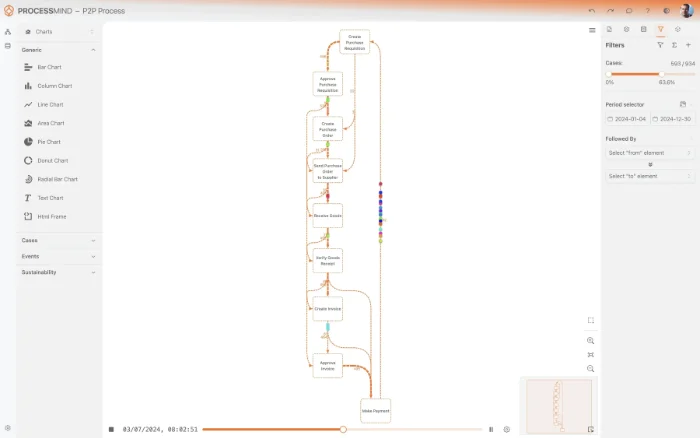
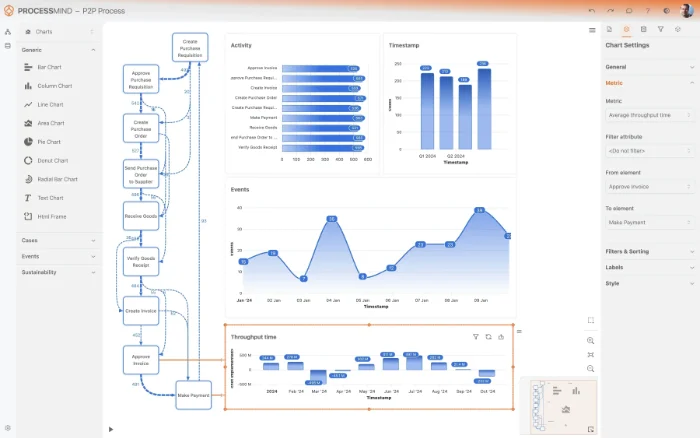
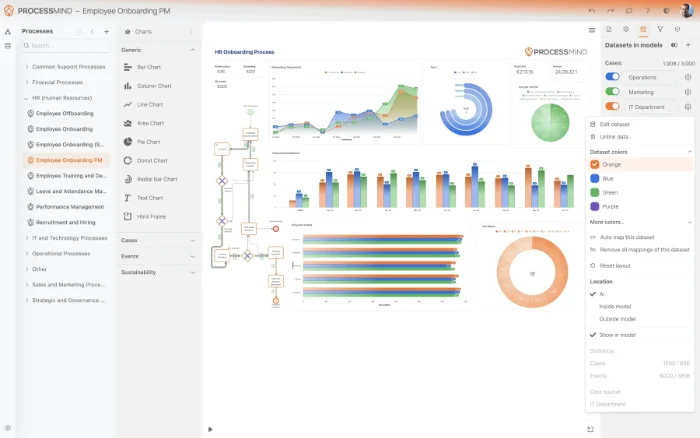
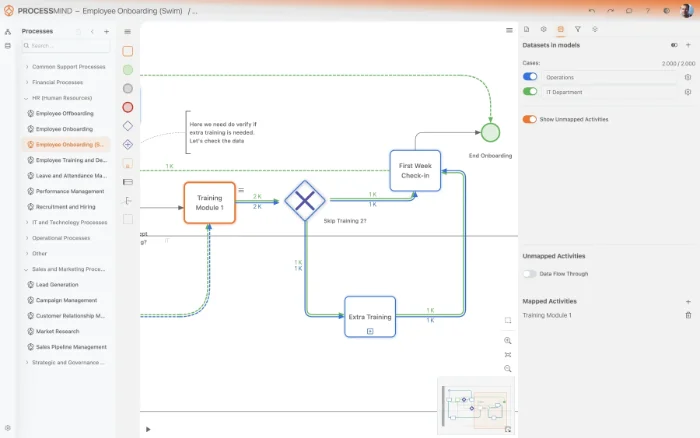
- Visualize your sales order process in D365.
- Identify hidden delays from order to payment.
- Pinpoint root causes of processing bottlenecks.
- Optimize order fulfillment cycle times.
TYPICAL OUTCOMES
Achievable Outcomes
These outcomes illustrate the tangible benefits organizations can realize by applying process mining to their Order to Cash - Sales Order Processing in Microsoft Dynamics 365. By pinpointing bottlenecks and inefficiencies, businesses can drive significant operational improvements and enhance customer satisfaction.
Reduction in end-to-end processing
By identifying and eliminating bottlenecks, organizations significantly cut the time from order creation to closure, enhancing overall operational efficiency.
Accelerated post-delivery invoicing
Streamlining the billing process reduces the time from goods delivery to invoice creation, directly improving cash flow and financial health.
Decrease in processing errors
Process mining pinpoints root causes of rework, leading to a substantial decrease in errors and associated operational costs within sales order processing.
Increased rate of timely collections
Optimizing the payment collection process, from invoicing to reminders, leads to a significant rise in the percentage of payments received on time.
Higher on-time delivery rates
Identifying and resolving delivery bottlenecks ensures more sales orders are delivered by their promised dates, significantly improving customer satisfaction.
Standardized sales process execution
Process mining identifies non-compliant process variations, allowing organizations to enforce standardized execution and reduce operational risks.
Results vary based on process complexity, existing system configurations, and data quality. These figures represent typical improvements observed across various implementations.
Recommended Data
FAQs
Frequently asked questions
Process mining analyzes event logs from Dynamics 365 to visualize the actual flow of your Order to Cash process, identifying bottlenecks like credit check delays or rework. It reveals deviations from the standard process and quantifies their impact, helping you reduce overall cycle time and improve delivery adherence. This leads to greater efficiency and enhanced customer satisfaction.
You typically need event logs containing a case identifier, Sales Order ID, an activity name, for example, "Order Created", "Credit Check", "Invoice Posted", and a timestamp for each activity. Additional attributes like sales organization, customer ID, or material can enrich the analysis. This data is usually extracted from tables related to sales orders, invoices, and logistics in Dynamics 365.
You can expect reductions in sales order cycle time, accelerated credit check approvals, and improved on-time payment collection. Initial insights can often be gained within a few weeks of data ingestion and model creation. Realizing significant improvements through targeted actions typically takes several months, depending on the complexity of changes.
The primary technical requirement is access to your Dynamics 365 database or an equivalent data export mechanism to extract the necessary event logs. You will need a process mining tool, which can be cloud-based or on-premise, and potentially an ETL, Extract, Transform, Load, tool for data preparation. Basic data modeling skills are also beneficial for configuring the event log.
Yes, process mining can effectively detect non-compliant sales process variations by comparing actual process execution against predefined ideal or regulatory models. It highlights every deviation, allowing you to identify instances where orders bypass critical steps like credit checks or approvals. This ensures standardized sales process execution and helps maintain compliance.
No, process mining goes beyond traditional reporting by reconstructing the actual end-to-end process flow from event data, rather than just showing aggregated metrics. It discovers hidden variations and non-conformances, providing diagnostic insights into why certain problems occur. This allows for data-driven process optimization, not just monitoring.
Process mining visualizes all sales order rework loops and exceptions, identifying their frequency, root causes, and impact on overall cycle time. By pinpointing where rework occurs and the conditions that trigger it, you can develop targeted strategies to minimize these costly deviations. This leads to reduced rework rates and a more streamlined process.
Process mining is scalable and beneficial for organizations of all sizes, from small teams to large enterprises. While larger organizations may have more complex processes and data, even smaller teams can gain significant insights into their operational efficiency and identify areas for improvement with targeted analysis. The key is having sufficient event data.
Optimize Order to Cash - Sales Order Processing Now
Pinpoint inefficiencies and reduce cycle time by 30% for faster fulfillment.
No credit card required. Setup in minutes.