Analyzing Processes in ProcessMind
Learn how to explore, filter, and understand your process data using ProcessMind dashboards. A guide for dashboard viewers and analysts.
Not every case follows the same path. A process variant is a distinct sequence of activities that a case can follow. Most orders go through “Order Created → Invoice Sent → Payment”, while a smaller group skips or repeats steps. Understanding your variants is the key to spotting unnecessary complexity and opportunities for standardization. You can see the variants in your own data with a free trial.
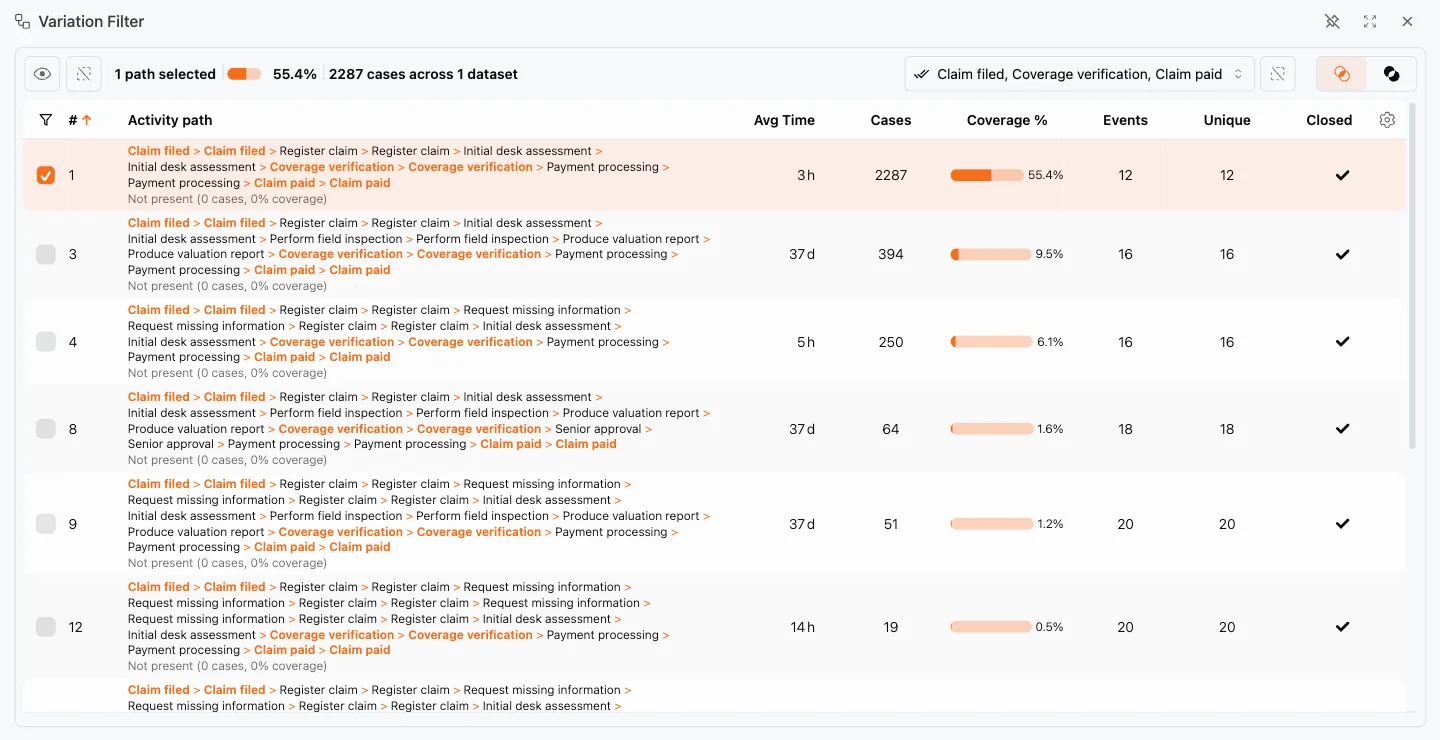
ProcessMind groups the cases in your dataset by the sequence of activities they follow. The list of variants is part of the variation filter:
The variants that cover the bulk of your cases are your happy path; the long tail represents exceptions and special handling.
Variants often differ dramatically in time:
Once you know which variants matter, ask why they exist:
Use your variant analysis to drive improvement:
Get instant access with no credit card and no waiting. Turn the way your organization works into clear, connected process designs.
Build your process architecture, define ownership and controls, and align roles and responsibilities across every level.
Start your free trial and create one reliable foundation for governing, managing, and continuously improving your processes.
We use cookies to improve your experience, personalize content, and analyze traffic. Anonymous page measurement happens without them; analytics consent adds an identifier that links your visits. By clicking "Accept All," you consent to our use of cookies.