Essential Guide to BPMN 2.0 Building Blocks
Master BPMN 2.0 building blocks: events, activities, gateways, artifacts, and more for clear, effective process modeling.
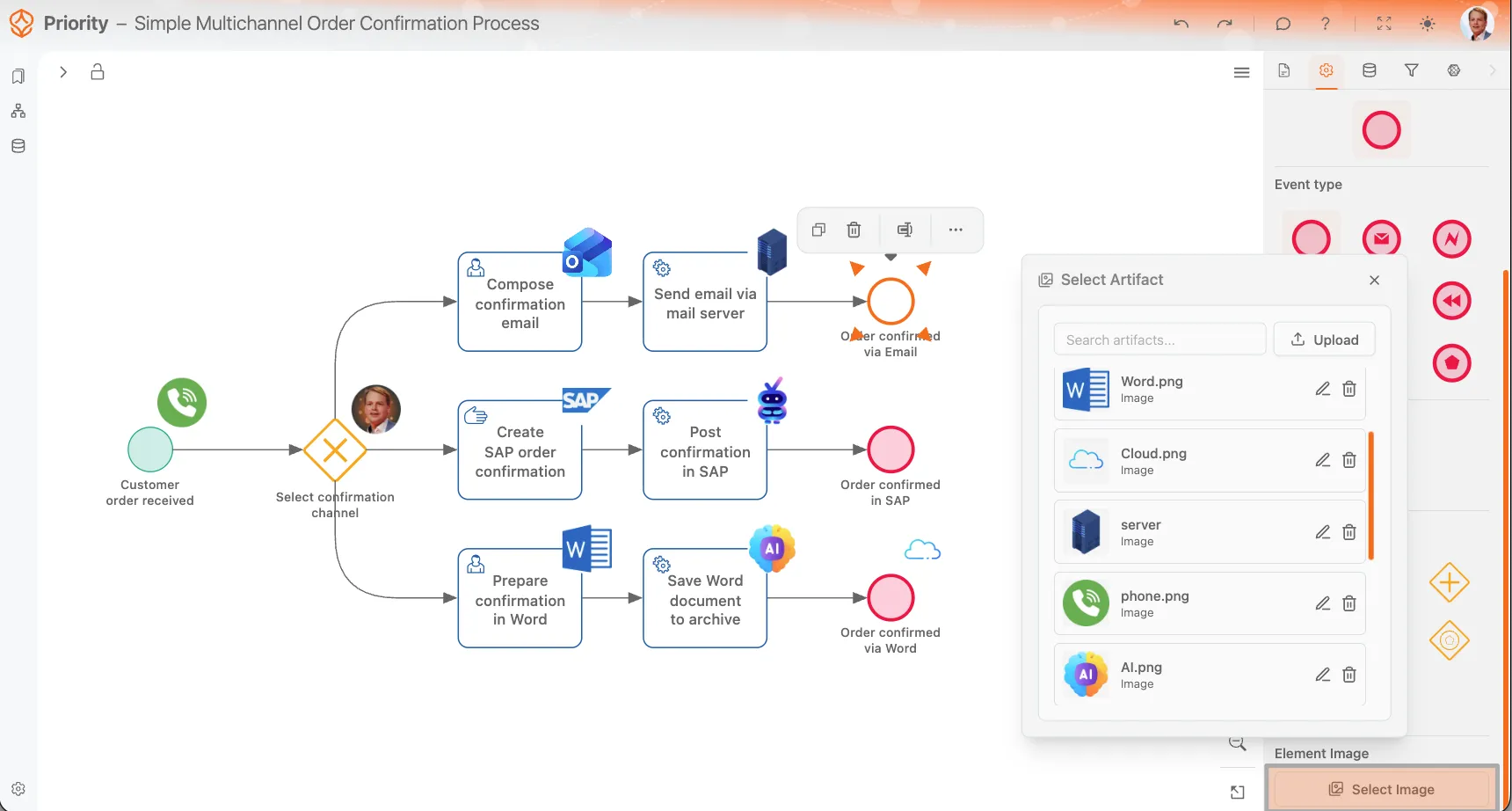
Custom element images give your process model more character and make it easier to understand what is happening in a process or which systems are involved. A small visual cue can quickly show whether an activity is done in SAP, by email, in Word, or through another system, without adding extra labels to the diagram. You can try custom icons on your own model with a free trial.
This feature works with uploaded image artifacts. You can upload images, assign them a clear name, and place them on BPMN elements such as activities, events, and gateways. Process Architecture Process Architecture Available with a Process Architecture seat or higher. Only seats on this plan or a higher one can use this feature. Compare plans
Start from a description and the AI builds the BPMN model; then make it yours with custom element icons and attachments.
When you attach an image to an element, ProcessMind shows it in a fixed square area in the top-right corner of the element. The position is not configurable, so every image stays aligned consistently across the model.
Because the image is always shown inside a square frame, it is best to use artwork that already works well in a square format. Transparent images are strongly recommended, because they usually look better in both light mode and dark mode.
You can also upload an image directly from the image selector opened for that element. This is useful when you are modeling and immediately notice that a task, event, or gateway needs a visual indicator.
Uploaded images are stored as reusable artifacts. This means the same image can be used on multiple elements across a process.
If you delete an uploaded image artifact, it will be removed from every element where it is currently used. Before deleting an image, make sure it is not still needed elsewhere in the model or documentation.
In addition to element images, you can also upload artifacts for the Documentation tab. These attachments are useful for linking process-wide documentation or element-specific supporting files such as instructions, screenshots, reference documents, spreadsheets, or presentations.
This makes it possible to attach documentation and reference material directly to the process, individual elements, or supporting documentation flows.
ProcessMind currently supports the following artifact formats:
These formats can be used for visual element images or for documentation attachments, depending on the artifact type and where you use it in the model.
BPMN Export
Keep in mind that element images are not included when you export your BPMN model as XML. They are only stored and displayed within ProcessMind for visualization and documentation purposes. If you need to share the visual model with element icons, consider exporting it as a PNG file instead.
Image artifacts make process models more visual and quicker to scan. They help readers understand which tools, systems, or outputs are involved in a process while keeping the diagram clean. For the best result, use transparent square-friendly images, give them clear names, and remember that deleting an uploaded image removes it everywhere it is used.
Start from a description and the AI builds the BPMN model; then make it yours with custom element icons and attachments.
Get instant access with no credit card and no waiting. Turn the way your organization works into clear, connected process designs.
Build your process architecture, define ownership and controls, and align roles and responsibilities across every level.
Start your free trial and create one reliable foundation for governing, managing, and continuously improving your processes.
We use cookies to improve your experience, personalize content, and analyze traffic. Anonymous page measurement happens without them; analytics consent adds an identifier that links your visits. By clicking "Accept All," you consent to our use of cookies.