Process Intelligence Process IntelligenceAvailable with a Process Intelligence seat or higher. Only seats on this plan or a higher one can use this feature.Compare plansAvailable with a Process Intelligence seat or higher
Calculated Attributes
Most dataset attributes map to a column in your uploaded file. A calculated attribute works differently: its value is computed from an expression — for example to combine columns, extract parts of a timestamp, or categorize rows. Once created, it behaves like any other attribute in filters, charts, and metrics.
When to Use One
Derive new values without changing the source file — for example extracting a month from a timestamp or splitting a combined field.
Standardize data — map free-text categories onto consistent values before analysis.
Prepare reusable calculations — define a value once and use it in filters, charts, and metric expressions.
Creating a Calculated Attribute
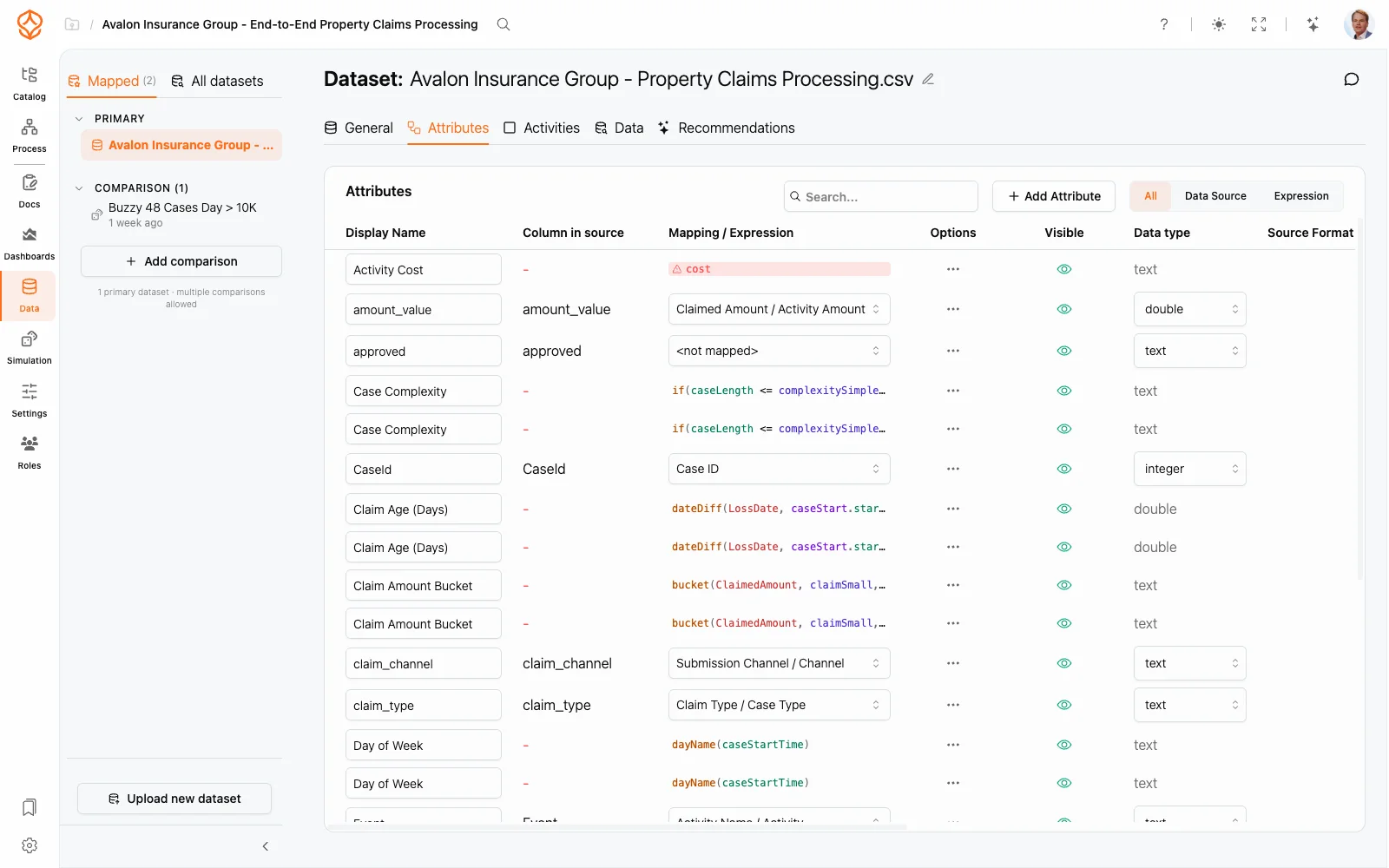
Open Data, select your dataset, and go to the Attributes tab.
Click Add Attribute and choose Expression Attribute.
A new row appears with the default name New Expression, and the Expression Editor opens straight away. Write the expression using the reference panel and check the live preview.
Click Save. The attribute’s data type is inferred from the expression.
Rename the attribute inline and toggle Visible as needed. New and updated values are recalculated in the background; the Values column refreshes when they are ready.
The toggle group above the table (All, Data Source, Expression) filters the list to calculated attributes only, so you can review them separately.
Editing and Removing
Reopen the expression — click the cell in the Mapping / Expression column (an empty expression shows the hint Click to add expression).
Rename — click the display name.
Hide or show — use the Visible toggle.
Delete — choose Delete attribute from the row’s menu. Note that the bulk action Delete all attributes without data! also removes expression-driven attributes: it deletes every attribute that has no source column, including calculated ones.
Where the Results Are Used
Calculated attributes are available everywhere attributes are:
A mapped column reads its value from the uploaded file; a calculated attribute derives its value from an expression that is evaluated when the data is processed.
Yes. Expression attributes appear alongside your other attributes and can be referenced by other expressions, filters, and charts.
Essential for the website to function. Cannot be disabled.
These cookies are necessary for the website to function and cannot be switched off in our systems. They are usually only set in response to actions made by you which amount to a request for services, such as setting your privacy preferences, logging in, or filling in forms. For more information please visit our cookies policy page.
Help us understand how visitors interact with our website.
These cookies help us to understand how visitors engage with the website. We may use a set of cookies to collect information and report site usage statistics. In addition to reporting site usage statistics, data collected may also be used, together with some of the advertising cookies described, to help show more relevant ads across the web and to measure interactions with the ads we show. For more information, please visit our cookies policy page.
Used to deliver personalized advertisements.
We use cookies to make our ads more engaging and valuable to site visitors. Some common applications of cookies are to select advertising based on what's relevant to a user; to improve reporting on ad campaign performance; and to avoid showing ads the user has already seen. For more information please visit our cookies policy page.
Remember your settings and preferences.
We use a set of cookies that are optional for the website to function. They are usually only set in response to information provided to the website to personalize and optimize your experience as well as remember your chat history. For more information please visit our cookies policy page.