On This Page

Dataset Data

Process Intelligence Process Intelligence Available with a Process Intelligence seat or higher. Only seats on this plan or a higher one can use this feature. Compare plans Available with a Process Intelligence seat or higher

Using the Dataset Data Screen

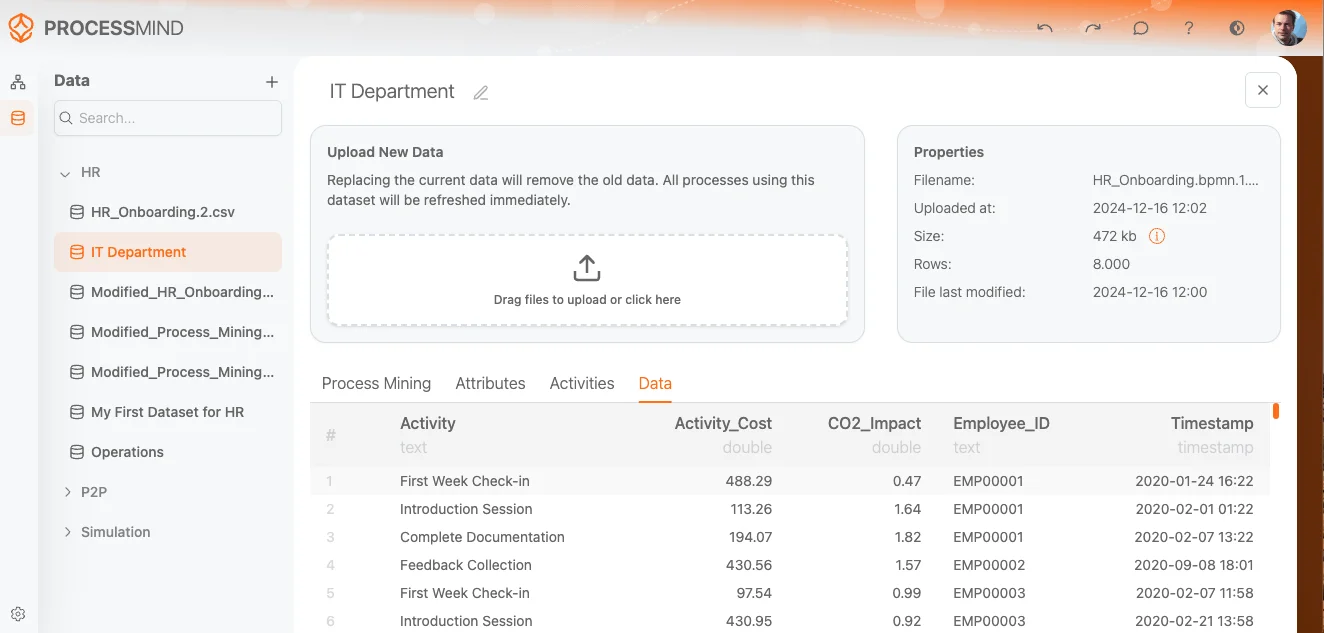
The Dataset Data screen provides a preview of the loaded data in a table format. This preview helps you understand how your data will be interpreted and used within the Process Mining analysis. image
Screen Overview

This section displays the actual dataset in a tabular form, showing a preview of how the data will be processed:

1. Column Names

  • The table shows the columns from your uploaded dataset. Typically, you will see columns such as Activity, Case ID, and End time, along with any additional attributes included in your file.

2. Data Preview

  • The data rows show the actual contents of your dataset. Each row represents a single event from your event log, displaying values for each column.

3. Data Structure

  • The table provides a structured overview of the dataset, helping you verify that the correct data is loaded and aligned with the column names.
  • This preview is useful for ensuring the dataset is ready for Process Mining analysis.

Final Steps

  • Use this Data Preview to ensure that your dataset is correctly formatted and that the activities, case IDs, and timestamps are aligned with your expectations.
  • Once satisfied with the dataset, proceed to use it in your Process Mining analysis.

By providing this preview, the Dataset Data screen helps ensure your dataset is ready for accurate process mining.