


RACI Matrix Template: Download, Fill In, and Import
Download a RACI matrix template in the CSV format ProcessMind imports and exports, then fill it in, import it back, and keep it true to the process.

A RACI matrix template is one table: process steps or decisions down the side, roles across the top, and R, A, C or I in the cells. This page gives you that table as a file you can fill in, the rule that keeps it usable, and the way to keep it true to the process instead of leaving it in a folder.
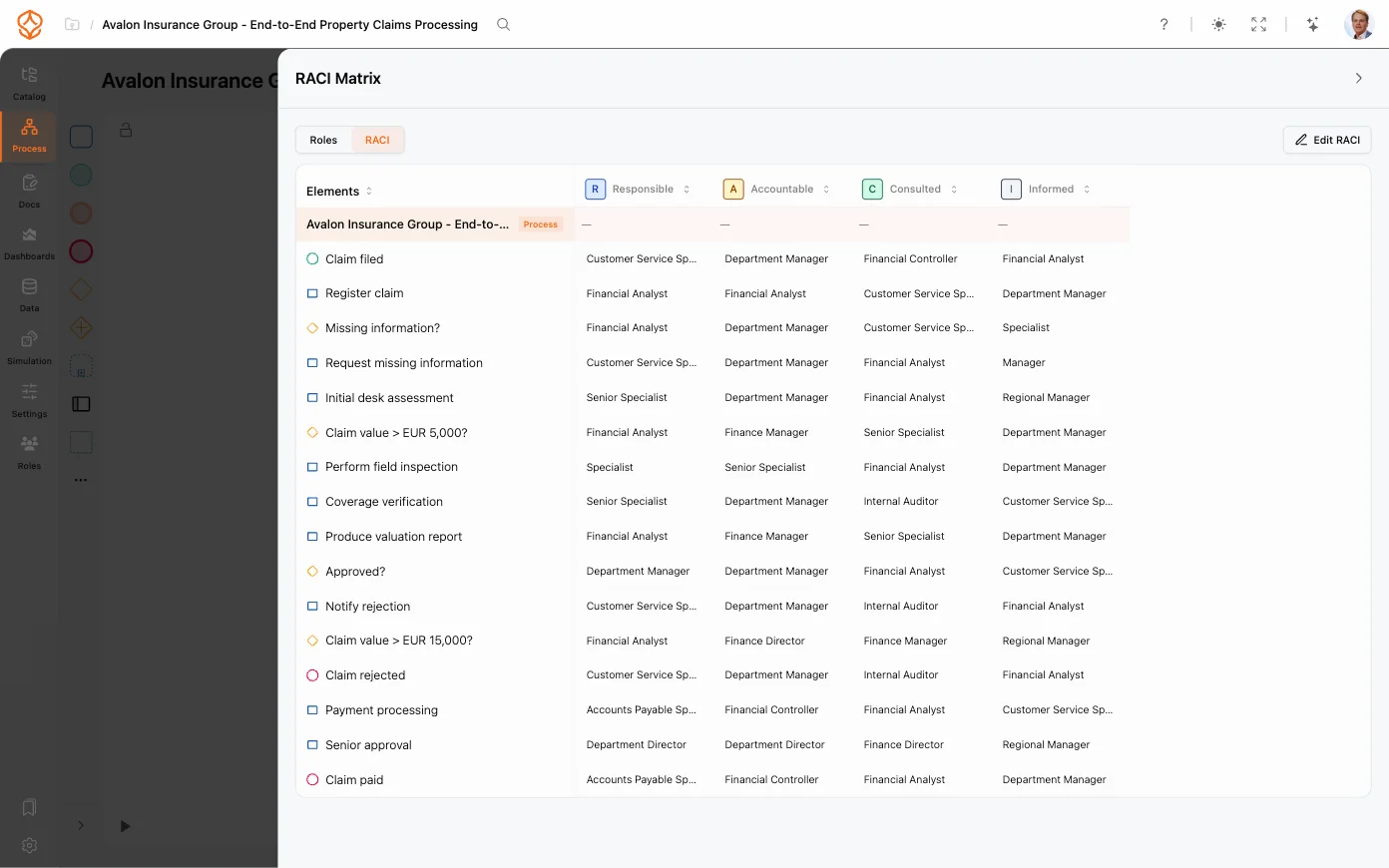
To learn what the four letters mean and when to use them, read the RACI explainer. This page is about the artefact, and about what keeps it accurate.
What is in the RACI matrix template?
The file has one header row and six columns. That header is not decoration: it is exactly what ProcessMind writes when you export a RACI matrix, so a file you build here imports back without rework.
| Column | What goes in it |
|---|---|
process | The process the row belongs to, so one file can hold several processes. |
activity | The process step or decision, named as it appears in the model. This is the field an import matches on. |
responsible | The role that does the work. |
accountable | The role that answers for the outcome. Exactly one per row. |
consulted | The role whose input can change the work before it happens. |
informed | The role that is told after the fact. |
Cells hold role names or abbreviations, and a step with several roles in the same capacity lists them with a semicolon: AP manager; Buyer. The names matter more than the formatting, because an import looks up each one in the role library and skips a name it does not recognise.
The template arrives with the invoice approval and employee onboarding examples from this page already filled in, so you can see the shape before you replace the rows with your own process. Keep the header as it is and overwrite everything below it.
The file holds assignments, not the whole process. The scope, the start and end points, the systems each step runs in and the trigger that starts it belong to the process documentation, which is where the matrix renders anyway. A spreadsheet can hold those fields too, and nothing keeps them in step with the model when the process changes.
Teams ask for this under several names: a RACI template, a RACI matrix format, a RACI diagram or RACI diagram template, a RACI chart template, a RACI model template, a RACI analysis template, or a plain responsibility matrix. It is always the same artefact: one table, four letters, and a rule about who signs off.
How do you fill it in?
Start with the rows. Take the process steps and decisions in the order the work happens, from a process map, a walkthrough of one real case, or an analysis of the event log. Department names make poor rows: “Finance” or “Legal” tells you which department exists, not who does what.
Then read each row and ask one question per letter:
| Letter | Role | Ask |
|---|---|---|
| R | Responsible: does the work. | Who performs this step? |
| A | Accountable: answers for the outcome and signs off. | Who explains the outcome if it turns out wrong, even when everyone followed the instructions? |
| C | Consulted: provides input that can change the work before it happens. | Would this person’s input change the result? |
| I | Informed: is told after the fact. | What does this person receive, and when? |
Two rules keep the result usable. Exactly one accountable role per row: two accountable roles leave ownership split, and none leaves the outcome unowned. And C only where the input can change the work, because every consulted role adds coordination. For a decision, the accountable role is usually the one that owns the budget or the risk, not the most senior person in the room.
Split a broad step into separate rows when different roles can decide different parts of it. “Legal reviews the contract” may cover liability, payment terms and governing law; if three roles can waive those, that is three rows, and the matrix starts telling you something the process model does not.
Keep people out of the file. A role can be renamed, merged or reassigned without touching the matrix, and in ProcessMind the people who hold a role are its assignees in the role library. If you need names on a row for one specific project, keep them in a separate note and let the matrix stay about roles.
What does a filled-in RACI matrix look like?
Both examples below ship filled in with the template, so you can see the shape before you replace them with your own process. The first is the RACI matrix example used across this page: a three-step invoice approval process with five roles. The test of a row is the same in both: one accountable role, and consulted roles only where the input can change the work.
| Process step | AP clerk | AP manager | Buyer | CFO | Vendor |
|---|---|---|---|---|---|
| Match invoice to purchase order | R | A | C | I | |
| Approve variance over 5% | R | C | A | ||
| Schedule payment run | R | A | I | I |
The AP clerk performs the work but does not own the outcome. The buyer provides input on the invoice match and variance because the purchase concerns both roles. The CFO signs off on material variances.
That exception path raises the question worth asking of any approval: how often does it run? If variance approval is rare, it is a genuine exception and the threshold is doing its job. If it runs often, either the threshold or the process needs a closer look, and the event log will show you which.
Employee onboarding
Onboarding crosses HR, IT, Facilities and the hiring manager, and a matrix is the quickest way to make the handoffs visible.
| Process step | HR | IT | Hiring manager | Facilities |
|---|---|---|---|---|
| Contract signed and returned | R, A | I | C | |
| Create accounts and access | C | R, A | C | I |
| Prepare desk and equipment | I | C | I | R, A |
| First-week plan and check-in | C | R, A |
The matrix assigns ownership for creating accounts and access, but that does not guarantee the work is done on time. It does make clear who should answer when access is missing, and that handover is worth checking against process data, where the delay may show up between two steps rather than inside either one.
How do you import the template into ProcessMind?
-
Export the current matrix first
Open the process, open its Documentation panel, then RACI Matrix, and choose Export RACI. You get a file named raci-matrix- plus a timestamp, with the same six columns as the template. That is your backup and your comparison. -
Fill the file in
Replace the example rows with your own process steps and roles, and keep the header row exactly as it is. Name every activity the way the model names it, because the activity name is what the import matches on. -
Import it
In the same RACI matrix menu, choose Import RACI and pick your CSV. Activities are matched to the open process by name, and each role cell is matched against the role library by name or abbreviation. -
Check what landed
Read the matrix back in the Roles or RACI layout. A name that did not match leaves a gap in the row, which is the quickest way to find a difference between your file and the model.
Export RACI writes the same six columns, so the file and the model stay interchangeable: export, edit in a spreadsheet, import back. That round trip is also the honest way to compare what the process holds with what a team has agreed.
You can use the file before the workshop rather than after it, too. Send the template with the process steps already filled in and ask each role owner to mark their own column; the disagreements are visible in the file before anyone books a room, and the import at the end updates the process in one step.
Why build a RACI in a tool instead of Excel or Word?
A spreadsheet is a reasonable place to draft a matrix and a poor place to keep one. Nothing ties the file to the process, so it ages quietly: the process changes, the file does not, and the RACI document in a shared drive is a year old by the time someone makes a decision with it.
A spreadsheet or a document
- One matrix per team, plus a copy in the wiki
- Role names typed into every file
- An attachment that gets overwritten, with no history
- Rows that outlive the step they describe
- The table copied into the documentation by hand
A matrix on the process
- One matrix, opened from the process it belongs to
- Roles from a library, renamed once
- Every change recorded, and restorable
- Assignments that follow the model when it changes
- The same matrix rendered into the process document
The difference shows up in ordinary work. Rename a role and a library keeps every process consistent while six spreadsheets keep six old names. Delete a step and the model drops the row, while the file keeps arguing for work nobody does. Change an owner and the documentation reflects it the next time someone opens the document, with no one copying a table. History is the part people miss most once it is gone: with a file, nobody can say who removed an accountable role, or when.
You can start from this template in Excel, and there is nothing wrong with that. Our honest recommendation is to build the matrix in the tool instead, because the moment it sits next to the process it stops being a file somebody has to remember to update.
How does ProcessMind build a RACI from the process?
Four steps, in the order they usually happen.
1. Put the roles in a library. Roles live in one place with a name, an abbreviation, the architecture level they belong to, a description, responsibilities in Markdown, tags and assignees. If you are starting from nothing, the roles wizard generates a set from the departments you choose, guided by your own files if you want it to be. The library imports and exports as JSON or CSV, which is faster than typing a role list twice. The names you settle on here are the names the template carries, so a library that is already consistent makes every later import and export uneventful. Where a role does not exist yet, add it once and it is available in every process.
2. Assign a role and a RACI level to each activity. Every activity has a Documentation tab where those assignments live. They belong to the activity, which is the part that stops the matrix and the process from disagreeing.
3. Open the matrix. In the process’s Documentation panel, RACI Matrix shows the whole picture: roles as columns or the R/A/C/I letters as columns, an enlarged view for a screen share, rows sorted by process order or by element name, and role columns added, removed or rearranged.
4. Keep the model and the matrix in step. Apply as lanes restructures the model so each role becomes a lane, which is the version of a RACI that swimlane readers recognise. Role history records every change to the library, and any point can be restored.
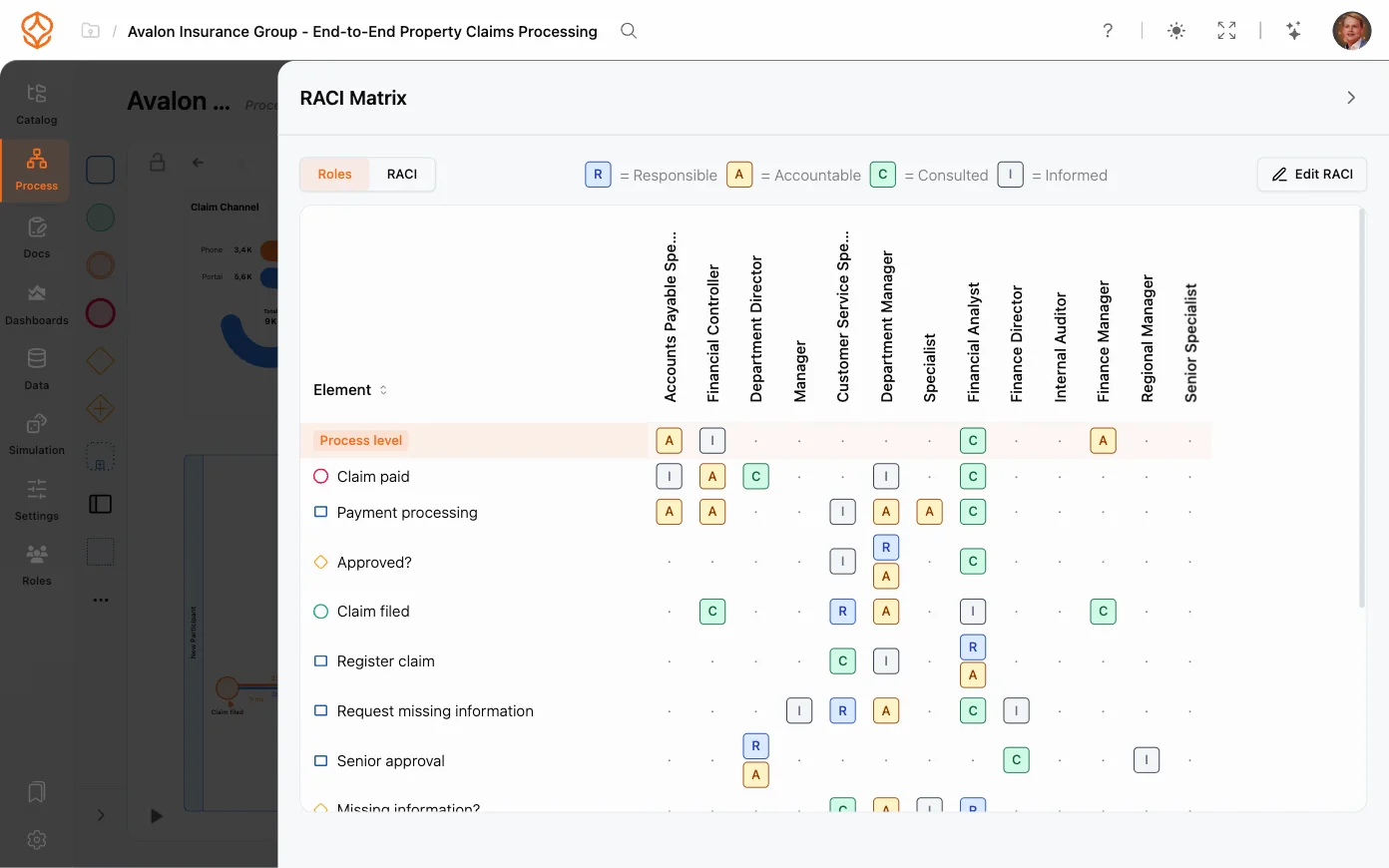
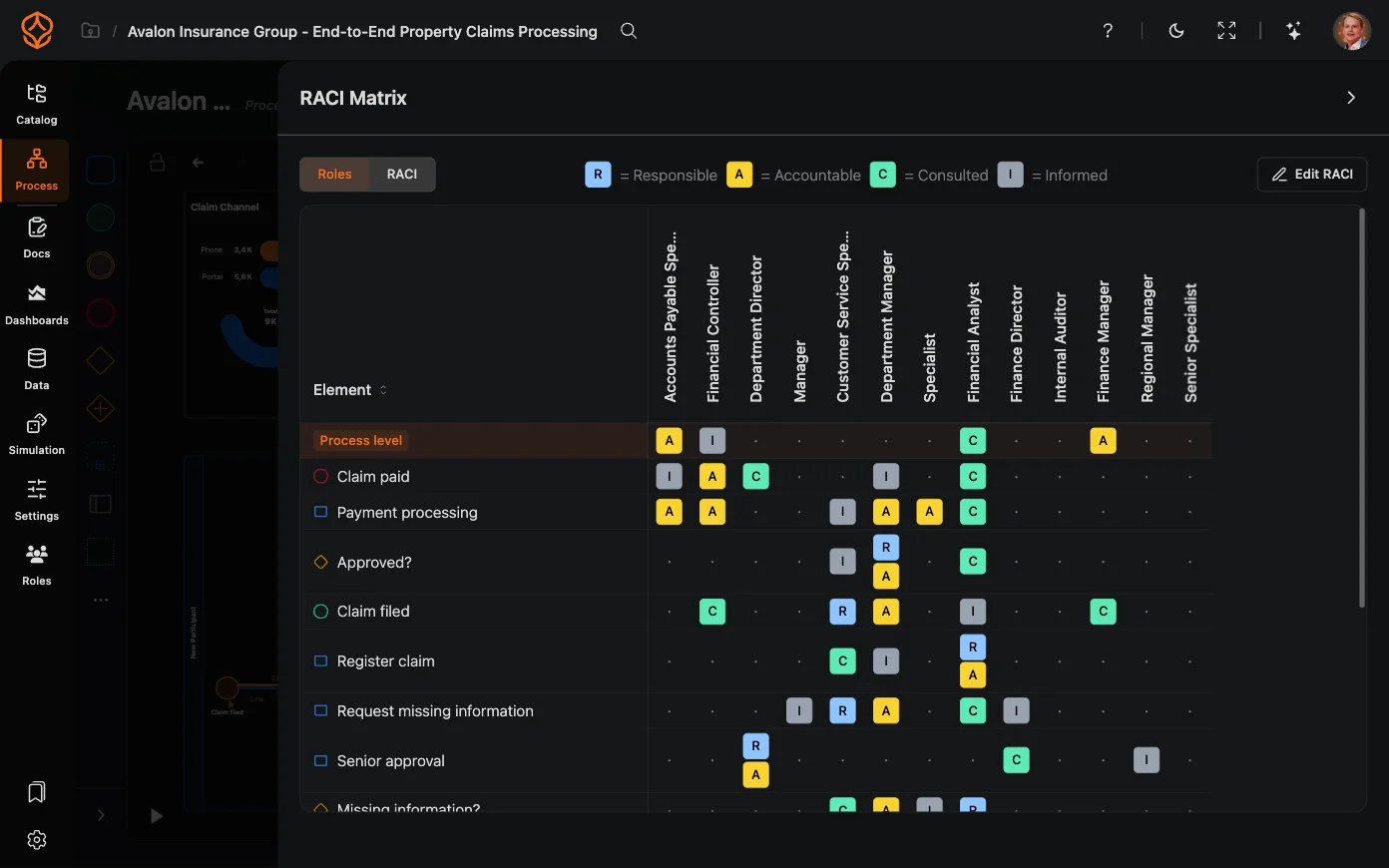
Assigning a role to an element is part of the model. The matrix view, the documentation it renders into and the Process Portal come with a Process Architecture seat, alongside hierarchy levels and governance. See what each plan covers.
How do you check the matrix against what actually happens?
A matrix is a hypothesis about the work: who should do what, as agreed by the people involved. Your systems already recorded who did what, so the two can be compared instead of believed.
- Who performs each step? If the data shows several roles executing a step the matrix gives to one, either the assignment is out of date or the work is not documented.
- Where does work wait? Delays between steps point at an approval or a handover, and often at a step with no accountable role at all.
- How often do exceptions occur? A variance approval that runs on most cases is not an exception, whatever the matrix implies.
Process variants show where cases follow different paths, and conformance checking compares the process you intended with the one the log records.
When the two disagree, decide which is wrong: a matrix that lists a role which no longer touches the step, or a step whose ownership was never written down. Both are findings, and both are cheaper to fix now than in the week before an audit.
How does the RACI appear in your process documentation?
The matrix is not a separate file that someone keeps in sync. It renders as a numbered section of the process document itself, usually 3.2 RACI, after the risks and controls and before the reference sections, with the same activities as rows and the same roles as columns.
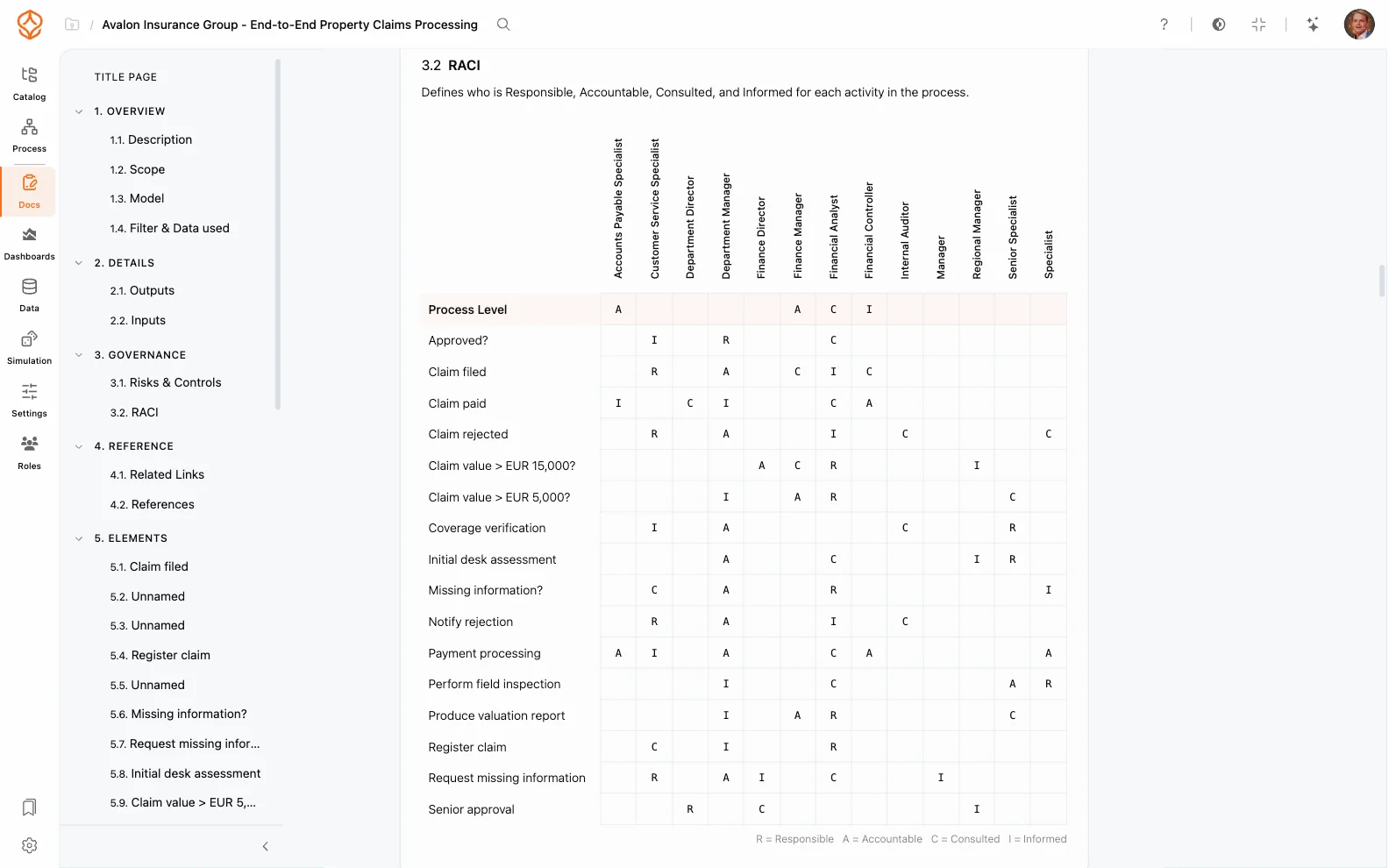
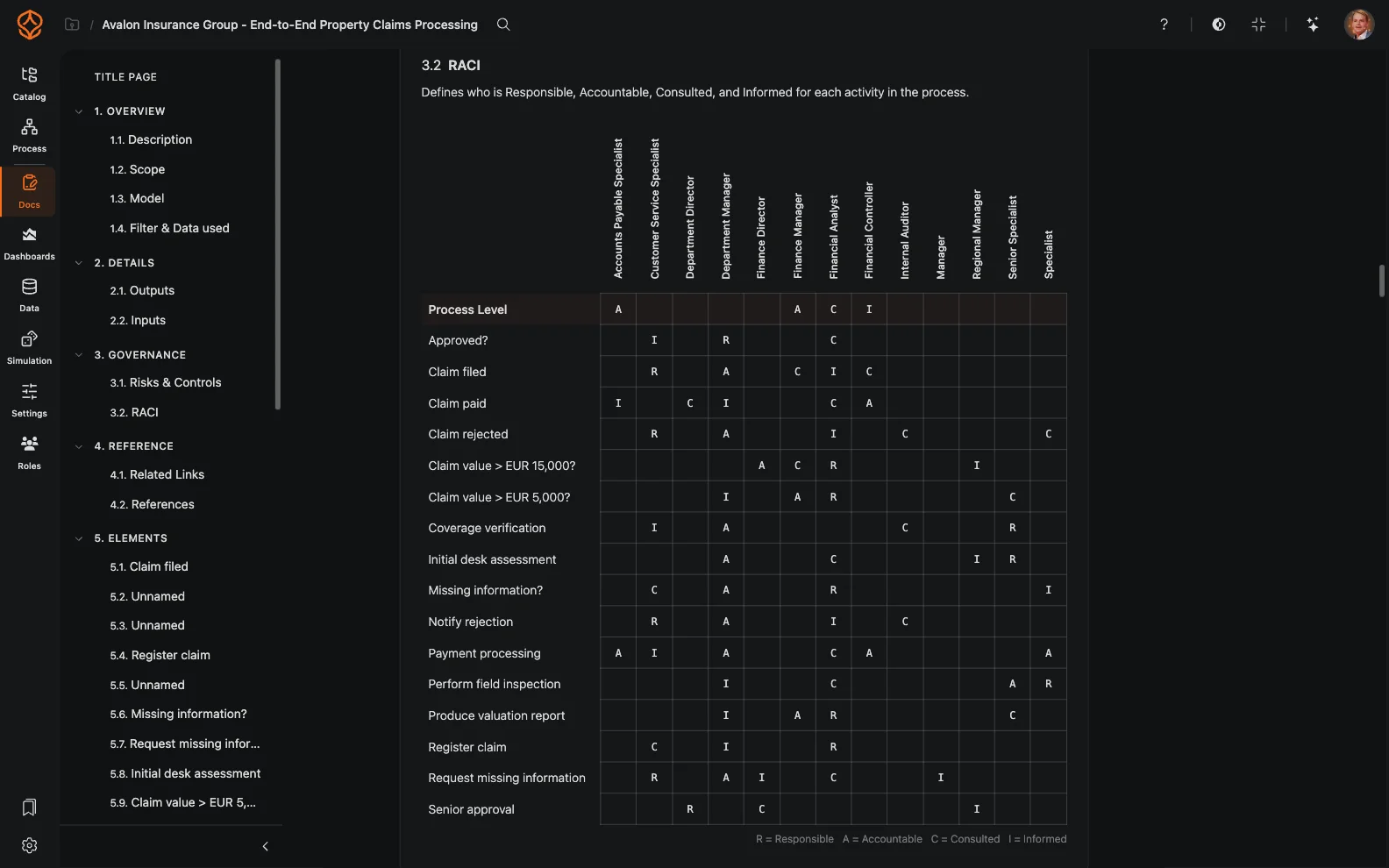
From there it travels without being rebuilt:
- Export. Word, PDF, Markdown or print, and every export reflects the current state of the process, including the RACI matrix and any attached artifacts. In the Word export the matrix is a real table, not a picture.
- Attach. Forms, checklists and work instructions sit beside the section they belong to, so a reader who lands on the RACI finds the instruction next to it.
- Publish. Published documentation is readable by viewers in the Process Portal, which is how the matrix reaches the people who have to follow it.
Roles and RACI is the full walkthrough, and process documentation covers what else the document holds.
That is worth most in the week before an audit. The matrix in the pack is the one the process holds, activity by activity, so nobody has to reconcile a spreadsheet with a model to answer who approved what.
What mistakes make a RACI matrix hard to use?
Five, and each one is cheap to avoid:
- More than one A, or none. Assign exactly one accountable role to every row.
- Using C for people who only need an update. That is an I, and marking it C slows the work down.
- Using departments as rows. List process steps and decisions, so the rows describe work rather than the organization chart.
- Putting personal names in role columns. Use roles, so a reorganization or a promotion does not invalidate the matrix.
- Failing to review it. When the process changes and the matrix does not, people stop relying on it.
The last one needs machinery rather than discipline: review the matrix when the process changes, when ownership changes, before an audit, and on a review date you set. Round-trip the file and check the assignments against the event log, and the matrix stays a description of the work instead of a memory of it. Process governance covers the review side in more detail.
Where to Go From Here
You have a matrix, or a template you are about to fill in, and you want it to live with the process rather than beside it.