
Value Stream Mapping: Connect Strategy to Performance
Learn how value stream mapping connects end-to-end process architecture, real process data, and improvement work in ProcessMind.

Value Stream Mapping (VSM) gives you an end-to-end view of how work creates an outcome for a customer, from the initial request through the processes and handoffs to delivery. A workshop helps your team agree on how the flow works. Process data can then show where the map reflects reality, where it relies on estimates, and where waiting or rework deserves attention.
What Is Value Stream Mapping?
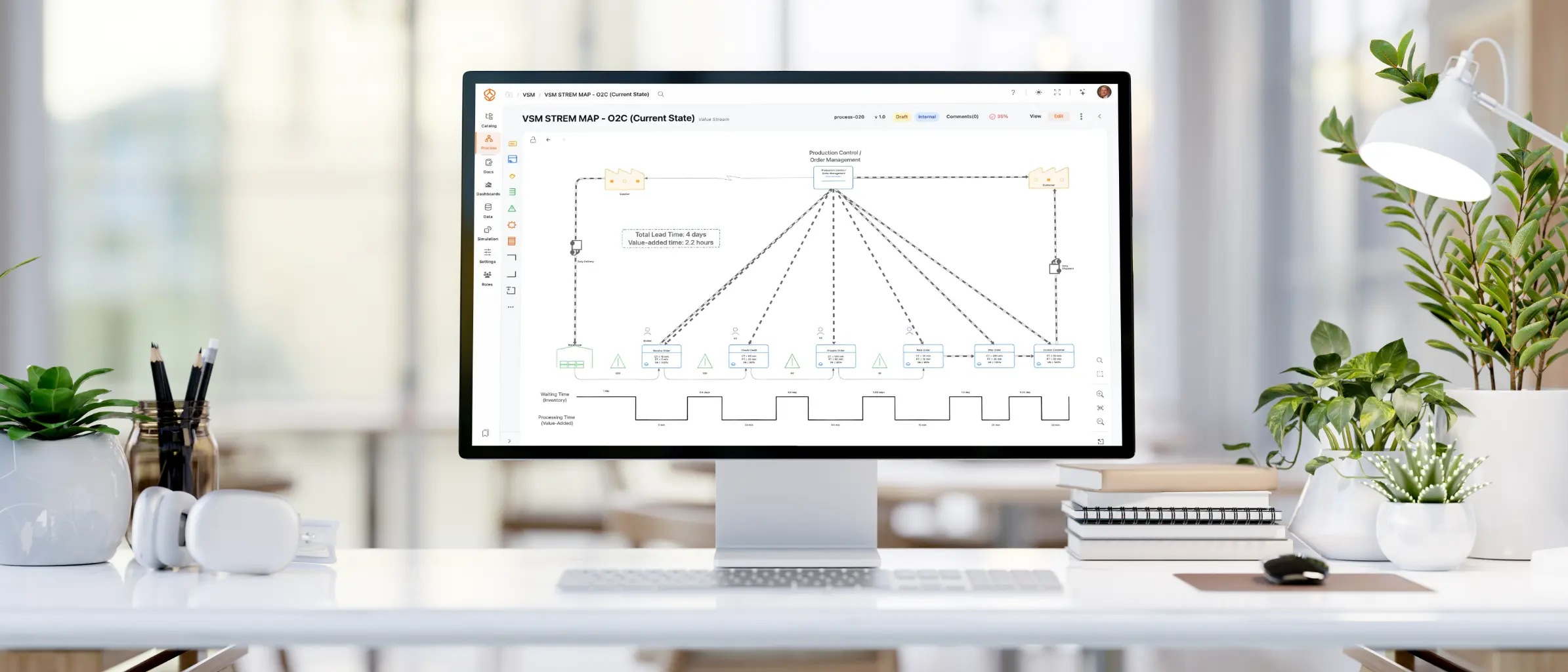
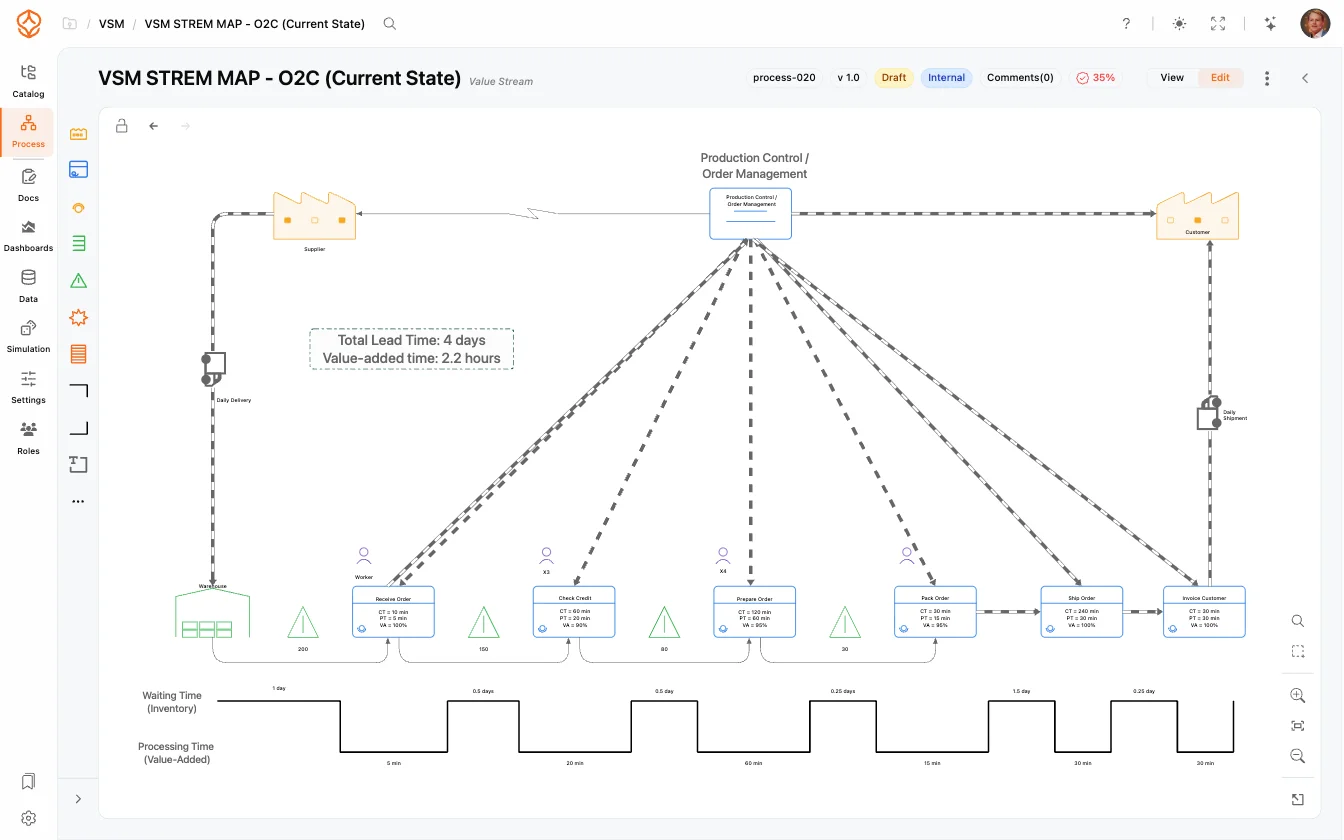
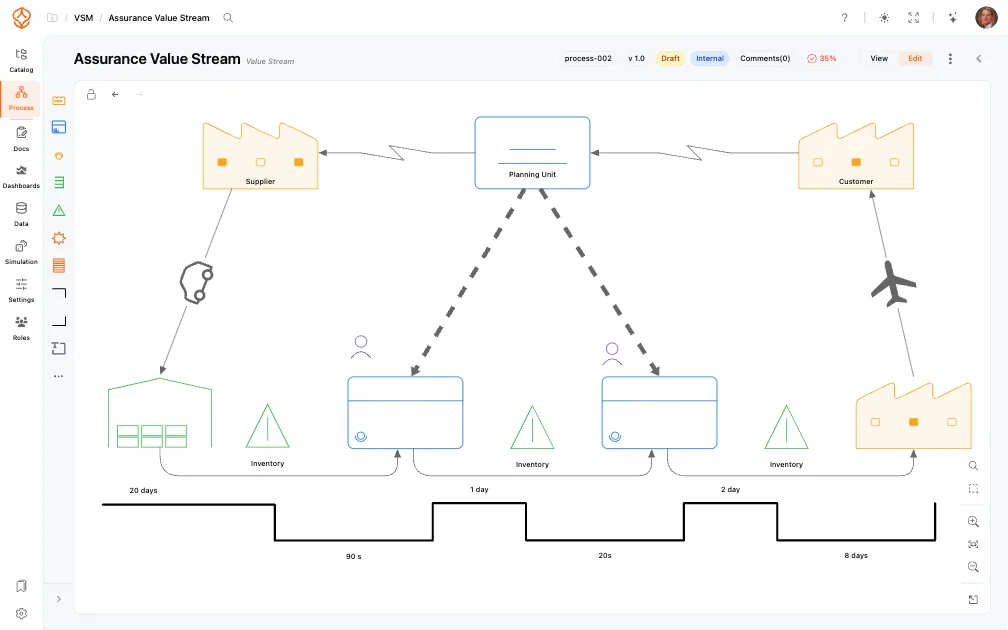
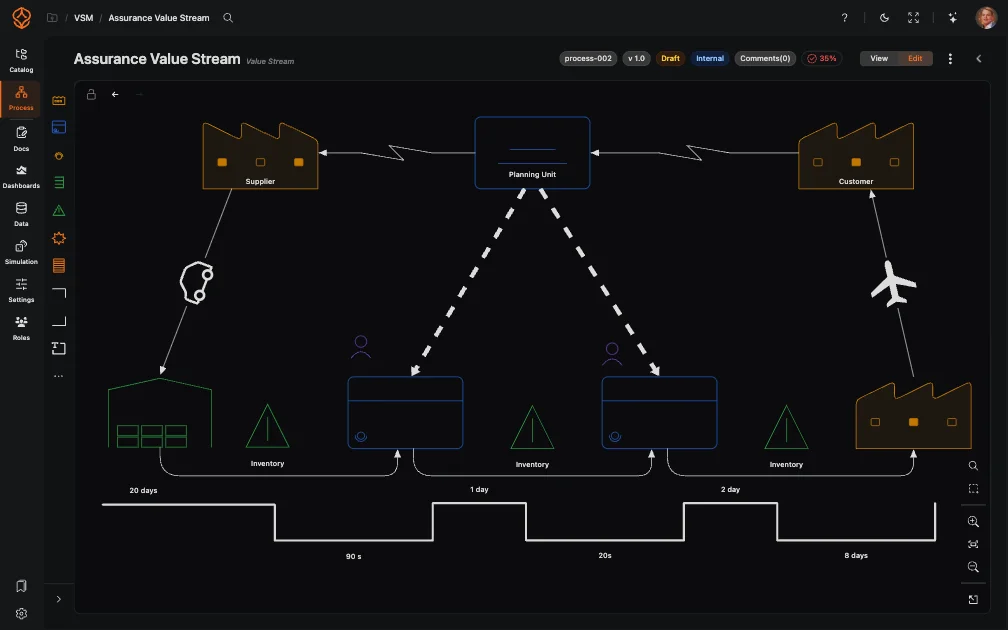
Value stream mapping is a Lean method for showing how work, information, and materials flow through an organization to deliver a product or service. A value stream map typically shows the customer, suppliers, process stages, information flows, queues or inventory, and a timeline that compares total lead time with value-added work.
The map is not just a flowchart. It gives your team a shared view of the whole system from the customer’s perspective: where value is created, where work waits, where handoffs add friction, and where rework or variation consumes capacity.
Value stream mapping began in manufacturing, but you can use it for services, software, healthcare, finance, procurement, customer support, and other knowledge-work processes. The items moving through the flow might be orders, invoices, claims, requests, or decisions rather than physical goods. The map can span teams, systems, and departments, not just one team’s process.
Why Traditional Value Stream Maps Go Stale
A workshop-based map brings people together and captures what they know about the work. That makes it a useful starting point, but the map can quickly fall out of date:
- Documents and diagrams capture a moment. Processes, systems, responsibilities, and demand change.
- People may describe the intended process rather than the paths cases actually take.
- A map can show activities without connecting them to the objects being handled, such as orders, invoices, products, customers, or cases.
- A map may identify a problem without showing how often it occurs, how much it affects performance, or whether the trend is changing.
Keep the workshop. It gives your team a shared way to discuss the flow and agree on what to investigate. Then connect the map to process architecture and operational evidence so you can revisit its assumptions instead of treating them as facts.
In ProcessMind, you can model a value stream at a high level and link its stages to the processes beneath it, from the end-to-end view down to detailed process elements. You can also connect processes to the objects they create, update, approve, or hand over, and to related systems, teams, roles, policies, and documentation.
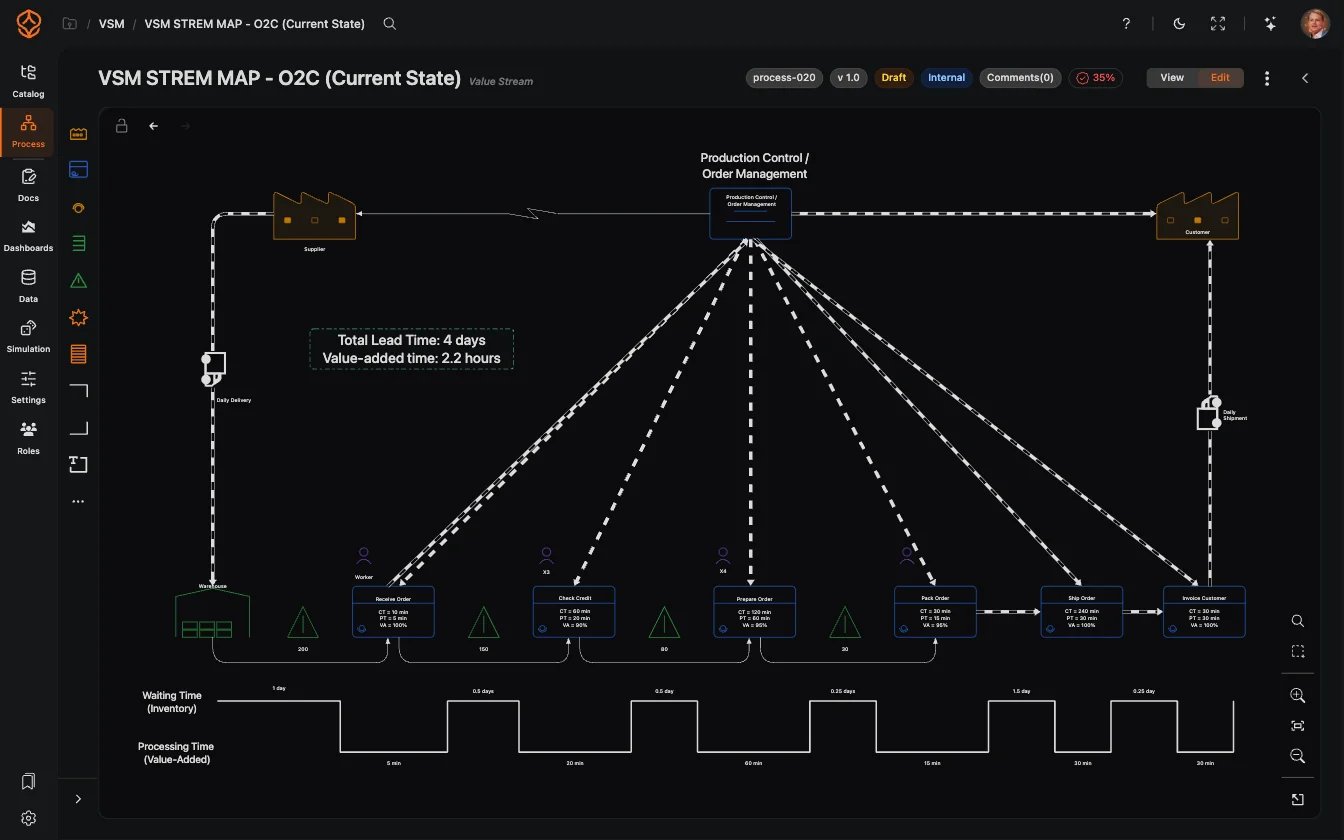
Value Stream Mapping Symbols at a Glance
VSM symbols give your team a shared visual language. The shapes below cover common elements in a value stream map and the question each one helps you answer.
| Symbol | What it represents | What it helps you see |
|---|---|---|
| Process box | A process step or work area | Where work happens |
| Customer | The recipient of the product or service | Where value is delivered |
| Supplier | The source of materials, information, or demand | Where the flow begins |
| Inventory or queue | Work waiting between steps | Where lead time accumulates |
| Supermarket | A controlled inventory point | Where downstream work can pull what it needs |
| Kanban post | A visual signal for movement or replenishment | How the pull system is controlled |
| Production control | Planning and scheduling | How work is released and coordinated |
| Push arrow | Work sent to the next step on a schedule | Where work moves without a downstream signal |
| Pull arrow | Work triggered by downstream demand | Where demand governs the flow |
| Manual information flow | Information passed by a person | Where a handoff may add delay |
| Electronic information flow | Information passed through a system | Where systems support the flow |
| Worker | A person performing a step | Where capacity and responsibilities sit |
| Data box | Measures for a process step | What the team tracks |
| Lead Time Ladder | A timeline of processing and waiting | How active work compares with elapsed time |
| Kaizen burst | An improvement opportunity | What the team wants to investigate |
| Bottleneck marker | A constraint on throughput | Where flow may be limited |
ProcessMind includes VSM shapes in a dedicated palette alongside BPMN shapes, so you can keep the end-to-end map and detailed process models in the same workspace. See the value stream mapping documentation for the full shape and connection options.
Value Streams, Objects, and Process Elements
A useful value stream map makes three things clear:
- What outcome are you delivering? For example, a fulfilled order, a paid invoice, or a resolved incident.
- Which objects move through the flow or change along the way? These might include a customer, order, product, shipment, invoice, claim, or service request.
- Which process elements create the outcome? These are the activities, decisions, events, and handoffs performed by people or systems.
One value stream can involve several related objects. An order may lead to a shipment and an invoice. A customer case may involve multiple interactions, tasks, and approvals. If you map only one path, you may miss how those objects relate.
Keep the end-to-end value stream in view, then connect it to the process elements and objects involved. That gives you a way to move from the customer outcome to the work behind it without trying to fit every operational detail into one diagram.
How to Create a Value Stream Map in ProcessMind
Use these seven steps to build a map with your team. At each step, the workshop gives you a shared view and process data can help you check the assumptions behind it. Process data adds evidence; it does not replace the workshop or the people who understand the work.
1. Define the customer outcome and scope
Workshop: Agree on the product, service, or outcome you want to improve. Set a clear start and end point, such as customer request to delivery or incident reported to incident resolved.
What process data adds: If your event data captures the relevant start and end events, you can measure elapsed time across that scope and see whether cases follow different paths. This helps you check whether the boundary you chose matches how the work is recorded.
2. Build the current-state architecture
Workshop: Map the major stages and the processes that perform the work. Arrange them in a consistent hierarchy so your team can move from the high-level value stream to the details. Record process owners and RACI roles while the people involved are together.
What process data adds: Event data can show which activities occur, in what order, and how often cases take different routes. It can help you identify where the documented stages need more detail or where actual paths vary from the workshop’s shared view.
3. Connect objects, systems, and evidence
Workshop: Identify the objects handled at each stage, such as orders, invoices, or cases. Note the systems, policies, work instructions, and teams involved, and connect them to the relevant process elements.
What process data adds: Event records can help validate which objects and systems appear in the observed flow, where handoffs take place, and which process steps are recorded. The data only shows what your source systems capture, so use the workshop to add context that is not in the log.
4. Validate the map with real performance data
Workshop: Review the map with people who do the work. Ask where queues, rework, and handoffs occur, and record the team’s estimates for lead time, cycle time, and volume.
What process data adds: Process mining can calculate observed lead time, cycle time, waiting, throughput, and rework from event data. You can compare those measures with workshop estimates and see which steps or variants contribute most to delays. The results depend on the events and timestamps available in your data.
5. Design and prioritize the future state
Workshop: Agree on a target flow and the changes needed to reach it. Consider unnecessary handoffs, ownership, demand, and capacity. Mark opportunities such as automation, standardization, policy changes, or system integration, then prioritize them by customer impact and measurable performance.
What process data adds: The current-state analysis gives you a measured baseline for prioritization. It can show how often a delay or rework pattern occurs and which cases it affects. It does not decide what the future state should be; your team sets that direction.
6. Test changes before implementation
Workshop: Review proposed changes with the people who understand the work and the teams responsible for making them. Discuss likely trade-offs and what you need to verify before implementation.
What process data adds: ProcessMind simulation lets you test staffing, arrival volumes, routing, and process changes against the current baseline. Use the results to explore possible trade-offs and inform your future-state plan. Simulation supports planning; it does not implement changes or guarantee their outcomes.
7. Govern and improve continuously
Workshop: Agree who owns the map, who reviews it, and when to revisit it. Update the model when ownership, systems, policies, or the way work is done changes.
What process data adds: You can monitor process measures over time and check whether the flow or performance changes after an improvement. Keep the map, evidence, and improvement backlog connected so your team can review progress against the same shared view.
Current State vs Future State
The current state describes how work flows today. The future state describes a proposed flow after selected changes. You need both: one to understand the starting point, the other to guide improvement.
Build the current-state map with the people who do the work. Record the paths, queues, handoffs, and rework they see. Where process data is available, compare workshop estimates with observed lead time, wait time, and case variants. A workshop can explain why a queue exists; the log can show how often it occurs and how long cases wait.
The future-state map is a design, not a prediction. It should show the changes your team wants to make, who needs to act, and what outcomes you expect to affect, such as lead time, cost, or service level. Use the measured current state as a baseline. If you simulate proposed changes, treat the results as estimates based on the assumptions in the model.
The difference between the two maps becomes an improvement backlog. Assign owners and measures to each change, then review the results as the work progresses. Keep estimates, observed results, and simulation outputs clearly distinguished.
What to Measure on a Value Stream Map
A value stream map often compares value-added time with waiting and other non-value-added time. Choose measures that help you understand the customer outcome and locate delays in the flow.
| Measure | What it tells you | What to check |
|---|---|---|
| Lead time | Total elapsed time from the start to the end of the flow | Define the start and end events consistently |
| Cycle time | Time to complete a step or case | Specify whether you mean active work or elapsed time |
| Wait time | Time cases spend waiting between activities or stages | Check which timestamps let you distinguish waiting from work |
| Value-added time and %VA | How much of total elapsed time is spent creating customer value | Agree on what counts as value-added work |
| First-time-right or first-pass yield | How often work completes without correction or rework | Define what counts as a successful first pass |
| Throughput and demand | How much work completes and how much arrives | Use the same time period for both measures |
| WIP and queue levels | How much unfinished work is in the flow | Check whether your data captures open work |
| Rework and variant rates | How often work repeats or takes a different path | Confirm that events distinguish the relevant paths |
| Takt | The pace needed to meet customer demand | Compare available working time with demand for the same period |
Process data can measure only what your source systems record. Use the workshop to interpret the results, agree on what each measure means, and identify context the event log cannot provide.
Value Stream Mapping vs Process Mapping
Both methods use diagrams to describe work, but they answer different questions.
Process mapping shows the steps, decisions, and roles within a process. It helps you explain how work gets done and who is responsible. A process map can include operational detail about the activities and decisions inside that process.
Value stream mapping takes an end-to-end view of how an object, such as an order, claim, or case, moves across processes to reach a customer outcome. It highlights flow, waiting, handoffs, and performance across the wider value stream.
Use the value stream map to decide which part of the end-to-end flow needs attention. Then link to process maps or BPMN models for the detail behind a stage. For a closer look at the other method, read what process mapping is.
VSM and Process Mining Work Better Together
A workshop gives your team a shared scope and a way to discuss how value should flow. Process mining uses event data to show how cases move through systems. Together, they help you test assumptions without treating the log as a substitute for the people who understand the work.
- Start with the value stream to define an end-to-end improvement scope.
- Use process mining to examine recorded paths, delays, rework, and bottlenecks.
- Use process architecture to connect stages to detailed models, owners, and documentation.
- Use simulation to explore proposed changes against a baseline before implementation.
The workshop explains context and helps your team design the future state. The data helps quantify what is happening in the recorded process. Simulation helps explore possible outcomes under stated assumptions. Keep those roles distinct, and you can make improvement decisions with both operational knowledge and evidence.
Measure the flow from your own data to see how process mining can help validate the current-state map. For a step-by-step guide to the VSM model and its shapes, see the Value Stream Mapping documentation.
Common Value Stream Mapping Mistakes
- Mapping only one department: Include the stages and handoffs needed to deliver the customer outcome, even when they cross team or system boundaries.
- Confusing activity with customer value: A step may be necessary without directly creating value from the customer’s perspective. Make the distinction explicit.
- Treating estimates as measured facts: Label workshop estimates and compare them with process data where the relevant events are available.
- Mapping the typical path only: Ask about exceptions and variants, then use event data to check how frequently recorded paths differ.
- Adding too much detail to the top-level map: Keep the value stream focused on stages and flow. Link to detailed process models for operational logic.
- Stopping after the current state: Agree on a future-state design, owners, and measures so the map can guide action.
- Leaving the map without an owner: Set a review cadence and revisit the map when the process, systems, or responsibilities change.
Getting Started
Start with one product, service, customer journey, or demand type. Define a clear beginning and end, then bring together people who understand the work across those boundaries.
- Choose one object and one outcome. For example, an order that ships, an invoice that gets paid, or an incident that gets resolved.
- Map the stages as the work happens. Include queues and handoffs, and check assumptions with the people doing the work.
- Record what you know and how you know it. Mark workshop estimates separately from measures calculated from process data.
- Pick a small number of improvement priorities. Focus on the delays or constraints that matter to the customer and can be investigated.
- Assign an owner and review date. Revisit the map as the process changes and track the measures tied to your improvement goals.
ProcessMind connects value streams to the enterprise process architecture and the process models beneath them. You can keep the end-to-end view, supporting models, and performance evidence together rather than maintaining disconnected diagrams.
Start Building a Living Value Stream Map
Use ProcessMind to model a value stream, link its stages to detailed processes, and connect the map to process data. Your team can use the shared model to discuss the flow, validate workshop assumptions, and decide where to investigate next.
Where to Go From Here
The workshop helps you map the flow, but it cannot measure every wait between steps. Use process data to see how long cases spend waiting in the recorded process.
Make your value stream visible
Connect processes, objects, and performance data in ProcessMind. Map, analyze, and improve value streams from end to end.
transparency
insights
bottlenecks
into action