











Value Stream Mapping (VSM): Connect Strategy to Process Performance
Learn how digital value stream mapping connects end-to-end process architecture, real process data, and improvement work in ProcessMind.

Process Mining Definition
Process mining uses event logs from IT systems to automatically discover, visualize, and improve business processes. Unlike manual process mapping, it shows how work actually happens, revealing bottlenecks, deviations, and inefficiencies based on facts rather than assumptions.
Process mining software analyzes event logs to show how your business processes actually run. It reconstructs real process flows from digital records in your IT systems, including ERP platforms like SAP, CRM platforms like Salesforce, helpdesk tools, and other applications that record transactions. You can compare actual workflows with the ideal process, identify inefficiencies, and improve performance. Process mining solutions like ProcessMind make this easier. For a comparison, see our blog on the best process mining tools of 2026.
Wil van der Aalst, a pioneer of process mining, calls it an MRI for your business. It shows how your processes really run and exposes inefficiencies, bottlenecks, and opportunities to improve. That transparency makes process mining a foundation for digital transformation and continuous improvement. For more, see our strategic guide for data driven process improvement.
Imagine managing customer orders: every step, from receiving and approving an order to shipping it, leaves a digital record. Process mining connects these records to map the real journey of each order. Instead of relying on interviews or guesswork, you get a data driven diagram that shows every twist and detour. If your process were a hiking trail, process mining would draw the trail from footprints, not just the planned route. Sometimes the result is a messy squiggle that shows where you need to improve.
No geology or pickaxes required. The “mining” is digital, and the insights are real.
Upload a CSV or Excel file with your event log and ProcessMind will automatically discover your process, visualize it as a BPMN model, and highlight bottlenecks.
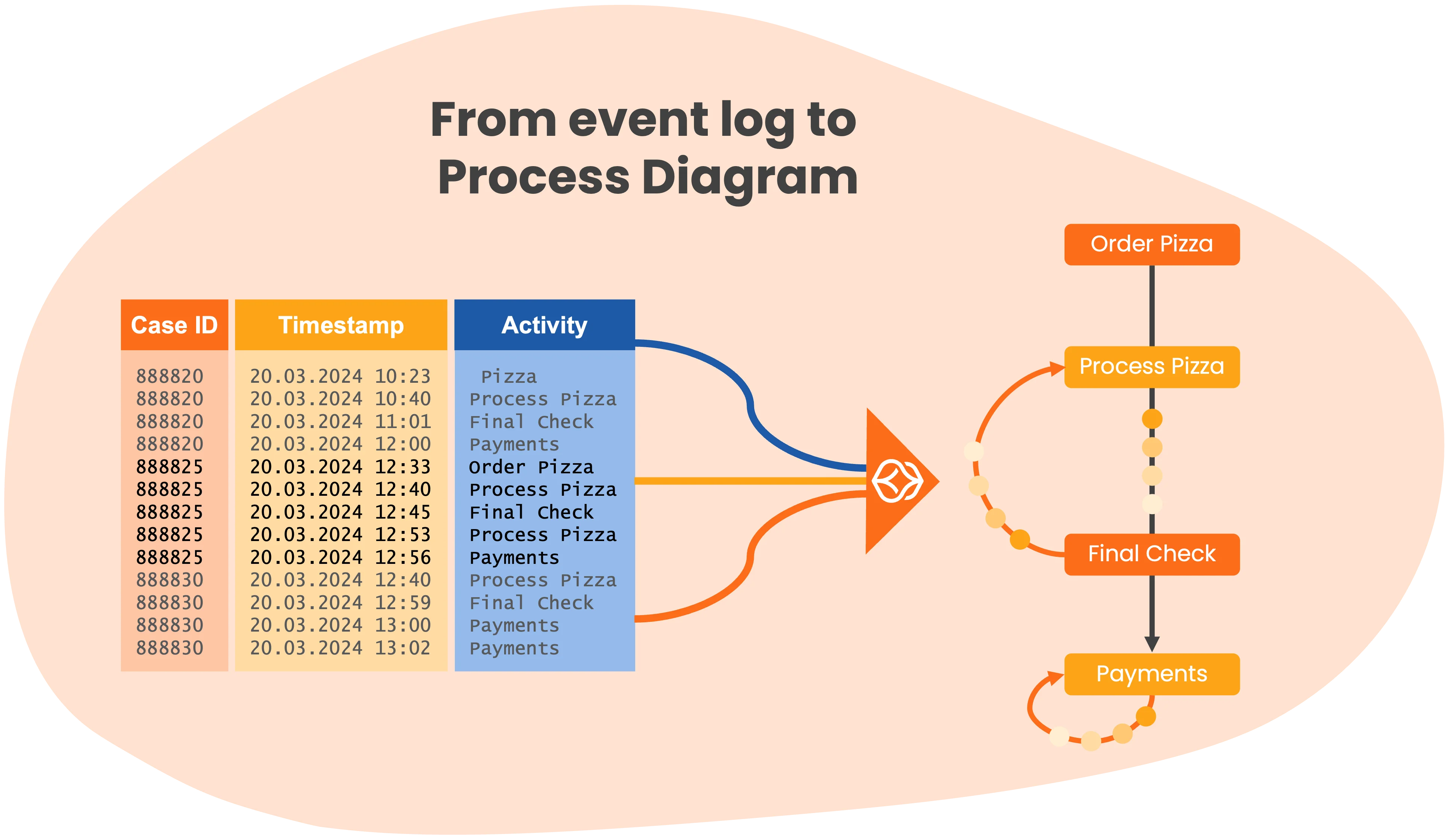
Process mining analyzes event logs from your IT systems. Most systems record every transaction or event, including three key elements: Case ID (order or ticket number), Timestamp (when each step happened), and Activity name (what was done). Process mining software ingests these event logs and reconstructs the sequence of activities for each case. By connecting all cases, the process mining algorithm generates a visual process diagram that shows every path your process can take, including rare exceptions and undocumented workarounds. Learn more about where to get data and which data formats you need.
Process mining has three main types, each with a different purpose:
Process Discovery is the most common type. Discovery algorithms automatically generate a process model from your event log data without requiring prior knowledge. You upload your data, and the process mining software shows how your process actually works. This is the starting point for most process mining projects.
Conformance Checking compares the discovered process, or “as-is” model, with a reference, or “to-be” model, to detect deviations. It answers the question: “Are we following the prescribed process?” Conformance checking is essential for compliance audits, identifying policy violations, and measuring how closely reality matches the intended design.
Process Enhancement, also called process extension, enriches an existing process model with additional data from event logs. Enhancement adds performance metrics such as bottleneck durations, wait times, and resource utilization to your process map. It turns a static process diagram into a dynamic performance dashboard.
Most process mining tools, including ProcessMind, support all three types. A typical project starts with discovery, uses conformance checking to validate the process against standards, and then applies enhancement to identify optimization opportunities.
Turning data into visual diagrams can feel like magic, but the real value comes from the “aha!” moments when hidden insights become clear. That is what makes process mining a key tool for business process improvement.
Modern process mining tools like ProcessMind are mature and user friendly, making process improvement accessible to business users. Here are the 5 steps to get started with process mining:

Collect event data from your systems, such as every step in your order-to-cash process. An Excel file is fine.

Use process mining software to automatically reconstruct the “as-is” process flow by linking events through their case ID and time order.
Upload or create a BPMN model that shows how the process should work. The process mining tool compares the discovered process with the expected process.

Use process dashboards to pinpoint bottlenecks, rework, and inefficiencies. Then start optimizing your business process.

Process mining is not a one-time project. Monitor your process continuously and keep improving it.
Process mining is a proven technology that has helped organizations worldwide find significant value. Early process mining projects were limited to large enterprises, but process mining applications like ProcessMind now make process intelligence accessible to organizations of all sizes. You can gain these key benefits:

Transparency & Insight
Process mining exposes blind spots in your workflows and shows where work goes right or wrong. No more guessing. You get hard evidence.

Efficiency Gains
Find inefficiencies, bottlenecks, and redundant steps. Simplify workflows to shorten cycle times and improve productivity.

Cost Savings
Efficiency gains reduce costs directly. Removing bottlenecks cuts overtime, eliminates rework, and improves resource use.
You may think you know how your processes run, but process mining often reveals a very different reality. See the real picture, not just the idealized version. Experience it yourself with our free trial.

Improved Compliance & Quality
Process mining acts as a compliance auditor, highlighting skipped or out-of-order steps. This is crucial for regulated industries and organizations pursuing ISO certifications.

Better Customer Experience
When processes run smoothly, customers notice. Process mining helps you find friction points and improve satisfaction.

Data-Driven Culture:
Process mining supports data-driven decisions and brings IT and business teams together around the same facts.
The takeaway
Process mining turns hidden operational noise into clear, actionable insight. It moves organizations from guesswork to precision and reveals improvement opportunities that were previously invisible. Business process mining turns hidden data into actionable knowledge. It helps organizations become more efficient, cost-effective, and responsive. No wonder it is one of the fastest-growing trends in business process management.

See the real-world impact of BPM solutions across industries.
We built ProcessMind to make process mining simple, affordable, and easy to set up. We used our years of experience to create something anyone can use.
Christiaan Esmeijer - CEO ProcessMind
How to navigate the challenges of process mining and overcome them.
The takeaway
For successful process mining, use data insights, ensure good data and skilled interpretation, and avoid witch hunts or aimless projects.
Like any powerful tool, process mining can be used wisely or misused. To help you stay on track, here are common “don’ts” and what you should do instead when using process mining in your organization:
Buying a business process mining tool will not automatically solve your process issues. It is a diagnostic aid, not a one-click solution. Think of it like a GPS: it shows the best route, but you still have to drive.
Dig into the results, discuss them with your team, and implement changes. The software may reveal that approvals are slow, but you must streamline the approval process or add resources.
Process mining supports continuous improvement. Keep monitoring your processes and make it part of ongoing operations.
Process mining is not about catching individuals doing something wrong. It is about improving the overall flow.
Make sure everyone understands this. Involve process owners and staff early. If the findings show that someone’s work takes longer, discuss what may be causing it. They may be handling 10 other tasks, or the system may be slowing them down. Use transparency to improve the process, not to assign blame.
The takeaway
Avoid these “don’ts” and follow good practices: be intentional, collaborate, and use common sense.
Ready to try process mining? Here is a simple roadmap:

Make sure key stakeholders understand what process mining is and what it can do.
Share examples or case studies to get everyone on the same page. It helps to have a small core team or champion who is excited about the idea. This could be someone from process improvement, an IT analyst, or a business manager who wants to address a specific pain point.
Build some momentum:
“We have a new way to examine our process data. Let’s try it.”

Choose one important but manageable process for your pilot. Good candidates have known issues or inefficiencies and readily available data. Your invoice approval process may have complaints about delays, or your customer support ticket process may be a black box.
Limit the scope to one business unit or product line rather than the entire global operation. Starting with a focused pilot helps you demonstrate value quickly.

Extract data for the pilot process in the simplest way possible. Use Excel or csv exports from your systems to get started quickly. Involve IT if you need help accessing event logs or combining data from different sources.
Start with a smaller sample for initial runs, such as one month of data. Scale up once everything looks right.
Clean the data: standardize date formats, check that every event has a case ID, and so on. Data preparation is often the most tedious step, but it is essential.

Now the analysis begins: load your data and let the process mining software generate your first process model.
Validate the data in the process mining application and confirm that it looks correct, including the number of cases and time ranges. If it does not, adjust your data preparation and try again.
Explore the process mining diagram. Check the main flow, branches, time spent, and the number of cases that follow each path. Use filters or sliders to focus on specific variants, such as orders that took >30 days.
Look for bottlenecks and patterns. Maybe 30% of orders go through 3 extra approval steps, causing delays. Or Team A finishes faster than Team B. Why? Take notes. Most tools let you export diagrams or screenshots, which will be useful later.
Bring the team together to discuss what you found and validate the results. Include people who know the process well, such as managers and front-line staff, along with your analysts. “We see a lot of loops back to the ‘data correction’ step.” A team member might say, “That is because we send the form back when it is filled out incorrectly.”
Brainstorm solutions for the biggest issues. For example, “What if we added a checklist to reduce form errors up front?” or “Could Manager approval be bypassed for low-value orders to save time?”
Prioritize the improvements with the greatest impact. Define metrics such as “reduce average cycle time by 20%” so you know what success looks like.

Implement the planned changes in the real process.
Once the changes are in place, use process mining again to measure their impact. Did average processing time drop? Are there fewer loops or rework instances? You have now closed the process improvement loop using data.
With a successful pilot complete, consider scaling up. Tackle the next problem process or expand mining to other departments. Many organizations build on early success to create a broader process mining program, sometimes establishing a Center of Excellence to support it.
The takeaway
Getting started is a journey, but each step is manageable. Learn the basics, choose a target, get your data, mine it, analyze and act, then repeat. Start small and learn by doing.
The takeaway
ProcessMind is a next-generation tool focused on simplicity and integration. It reduces technical hurdles, combines modeling with data, and supports action and collaboration. This makes process mining accessible to everyone. Try ProcessMind for free.
Any business process that leaves a digital trail can be mined. These are the most common process mining use cases:
Process mining works with data from any system that records events: ERP systems such as SAP, Oracle, and Microsoft Dynamics; CRM platforms such as Salesforce and HubSpot; helpdesk tools such as ServiceNow and Zendesk; and custom applications. If your system records a timestamp, activity, and case ID, you can mine it.
What is the difference between process mining and process mapping? They complement each other, but they work differently:
| Process Mining | Process Mapping | |
|---|---|---|
| Data source | Actual event log data from IT systems | Interviews, workshops, documentation |
| Output | Data-driven “as-is” model based on facts | Idealized “to-be” model based on perceptions |
| Effort | Minutes to hours (automated) | Days to weeks (manual) |
| Accuracy | Shows what actually happens | Shows what people think happens |
| Coverage | All process variants and exceptions | Typically only the “happy path” |
| Bias | Objective, data-driven | Subject to human memory and organizational politics |
Process mapping is useful for designing new processes, while process mining reveals what actually happens. The best results come from combining both: use process mining to discover the “as-is” process, then use process mapping or BPMN modeling to design the improved “to-be” process. ProcessMind supports both workflows on a single platform.
Learn how digital value stream mapping connects end-to-end process architecture, real process data, and improvement work in ProcessMind.
Learn what digital transformation means, its benefits and challenges, and how Process Mining, process modeling, and simulation support enterprise change.
Learn the DMAIC process, Six Sigma process, and lean process improvement tools to deliver measurable business results.
Compare Celonis process mining with ProcessMind to find software that fits your processes, budget, and goals.
Get instant access with no credit card and no waiting. Turn the way your organization works into clear, connected process designs.
Build your process architecture, define ownership and controls, and align roles and responsibilities across every level.
Start your free trial and create one reliable foundation for governing, managing, and continuously improving your processes.
We use cookies to improve your experience, personalize content, and analyze traffic. By clicking "Accept All," you consent to our use of cookies.