

Competitive Analysis Last updated October 25, 2026
UiPath Process Mining vs ProcessMind: Which Fits Your Team?
Compare UiPath Process Mining and ProcessMind on extraction, task mining, modeling, governance, pricing and fit for your process team.

UiPath Process Mining can be part of a broader automation platform, while ProcessMind is a workspace where the process architecture and the mined data stay connected, covering process mining, BPMN modeling and simulation. The right fit depends on what you need from process analysis: findings to inform automation in an existing UiPath environment, or a shared way to understand and improve processes across teams and systems. To compare a bundle with a standalone tool, estimate the seats and capabilities you will actually use, then compare the annual cost.
The Short Answer
Choose UiPath when your organization already uses UiPath for RPA and wants process mining in the same ecosystem. Its task mining can also capture desktop activity that server-side event logs do not show.
Choose ProcessMind when you need a shared place to analyze, model and simulate processes without adopting an automation platform. ProcessMind publishes per-seat pricing. Neither option is automatically less expensive. The answer depends on your seat count, the capabilities you need and how much of the wider platform you will use.
| Feature | UiPath Process Mining | ProcessMind |
|---|---|---|
| Sold as | A process mining capability in the UiPath automation platform | A standalone process intelligence workspace |
| Best fit | Teams already using UiPath that want mining to inform automation | Teams that need to analyze, model and simulate processes |
| Includes | Process mining and task mining, alongside UiPath automation capabilities | Process mining, BPMN 2.0 modeling and what-if simulation |
| Pricing model | Published tiers; some tiers are quoted per engagement | Published per-seat tiers |
What Each Platform Actually Is
UiPath Process Mining
UiPath positions Process Mining as a way to understand process flows and support automation. It sits alongside UiPath task mining, which captures desktop activity, and communication mining. UiPath also describes connections to its automation capabilities, including orchestration in UiPath Maestro.
UiPath documentation describes native extractors for SAP, Oracle, Salesforce, ServiceNow and Workday. It also describes PII redaction for task-mining data. These capabilities can matter if you want to analyze those systems or capture desktop activity within the UiPath environment. Findings can inform automation work in that ecosystem, and that connection is a key part of the bundle’s value.
ProcessMind
ProcessMind combines process mining, BPMN modeling and what-if simulation in one workspace. You can analyze event logs exported from your systems, compare actual process behavior with a model, and explore proposed changes. You do not need to adopt an automation platform to use it.
The platform gives process owners, analysts and operations teams a shared view of how work gets done. You can start with exported data, then document and refine the process in the same workspace.
UiPath Process Mining vs ProcessMind: Feature Comparison
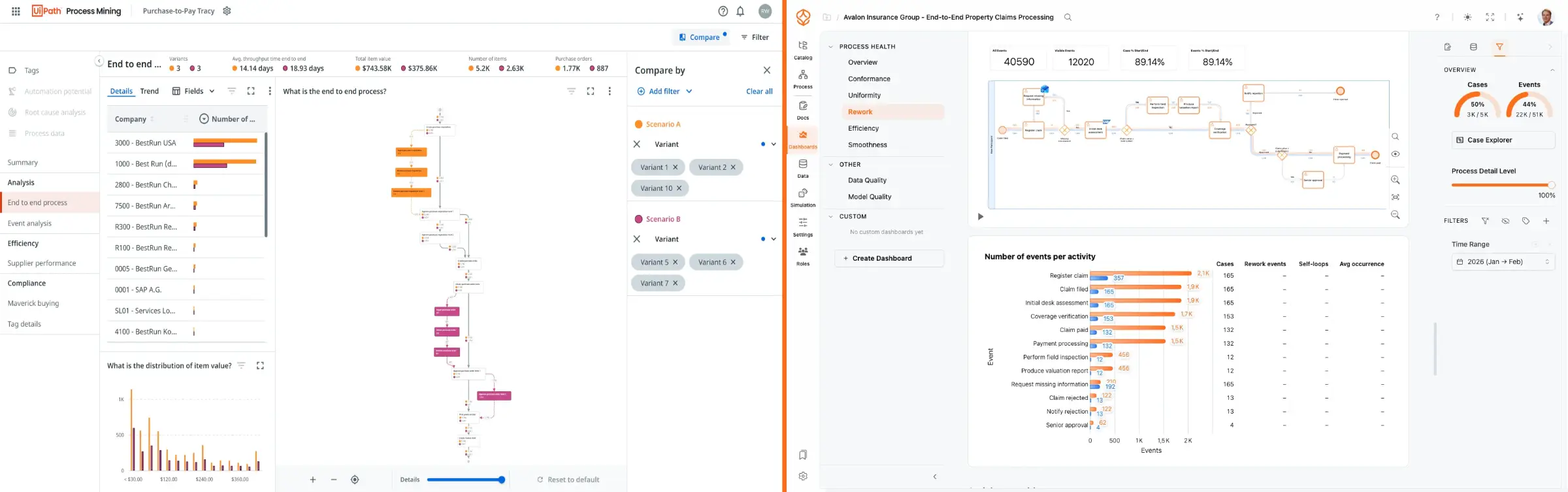
The UiPath descriptions below come from UiPath’s own product material. They are not the result of a head-to-head benchmark using the same data in both platforms.
| Feature | UiPath Process Mining | ProcessMind |
|---|---|---|
| Process mining | Case-based process analysis with a focus on automation opportunities | Process analysis with subprocesses, variants and handoffs |
| Extraction | UiPath documents native extractors for SAP, Oracle, Salesforce, ServiceNow and Workday | Analyze event logs exported from your systems |
| Task mining | Available, with PII redaction described in UiPath documentation | Not offered; ProcessMind analyzes server-side event logs |
| Modeling | Process modeling is available alongside mining and task mining | BPMN 2.0 modeling integrated with process analysis |
| Governance | Governance capabilities are part of the wider UiPath platform | Process catalog, ownership and versioning in the workspace |
| Simulation | Check UiPath documentation for the capabilities available to your plan | Simulate proposed changes against a mined baseline |
| Deployment | SaaS and on-premises options are described by UiPath | SaaS-first, multilingual and multitenant |
| Pricing model | Published tiers; some tiers are quoted per engagement (UiPath pricing) | Published per-seat tiers: Foundation, Architecture and Intelligence, plus free Individual and Enterprise by quote |
| Best fit | Organizations already invested in UiPath automation | Teams that need process analysis, modeling and simulation in one workspace |
Pricing and Time to Value
UiPath publishes a Community tier and paid tiers. Its pricing page lists some tiers as quoted per engagement. Check UiPath’s current pricing and terms directly. Your total cost depends on the package, deployment and capabilities you need.
ProcessMind publishes three self-serve paid per-seat tiers — Foundation, Architecture and Intelligence — plus a free Process Individual plan and Enterprise by quote. The subscription includes ten free portal viewers per Architecture or Intelligence seat, and SSO is on every plan. You can also start with a 14-day free trial. See ProcessMind pricing for current prices in your currency.
Use the same scope and time period to compare costs:
- Count the seats. Separate people who need to create analyses or models from people who only need to view results.
- List the capabilities you will use. Include extraction, task mining, modeling, governance and simulation where relevant.
- Estimate annual cost. Multiply the applicable per-seat costs by the number of seats and months. For a quoted platform, request a quote for the same scope and period.
- Include setup and ongoing work. Account for data preparation, administration and the time your team needs to maintain the analysis.
For example, if you expect to use process mining but not task mining or other automation capabilities, include only the seats and functions needed for that work in your comparison. If your team already uses the wider UiPath platform, account for the value of keeping the analysis in that environment. Then compare the annual cost for the same number of people and the same work.
This is more useful than comparing a bundle price with a standalone list price. A bundle may fit when you already use its wider capabilities. A standalone tool may make more sense when process analysis is the main need. We are not claiming ProcessMind costs less than UiPath; compare the actual scope and quote for your organization.
You can cost ProcessMind per seat before deciding which capabilities and roles to include.
Where UiPath Is the Better Choice
UiPath may be the better choice in several situations:
- Your automation program already runs on UiPath. Keeping mining in the same platform can reduce the need to manage another vendor and a handoff between tools.
- Your main goal is finding automation opportunities. UiPath positions its mining capabilities to help identify work for automation and connect findings to its automation environment.
- You need desktop-level detail. Task mining can capture activity that does not appear in server-side event logs. ProcessMind does not offer task mining.
- You want to use documented native extractors. UiPath documents extractors for SAP, Oracle, Salesforce, ServiceNow and Workday. Check the documentation for the systems and data you need.
- You need task-mining PII redaction. UiPath documentation describes redaction for task-mining data.
If these capabilities match your current setup and plans, the bundle may be more practical than adding a standalone tool.
Where ProcessMind Is Better for Process Teams
When mining is the bundle, not the product
If you received process mining as part of an RPA bundle, start by asking what you need mining to answer. Are you looking for tasks to automate, or do you need to understand how a process works across teams, systems and handoffs?
Finding automation opportunities is one use of process mining, but process teams may also need to document the current process, agree on a target state, assign ownership and assess the effect of a proposed change. A standalone tool can fit better when those needs matter more than keeping analysis inside an automation platform.
For a practical method to identify candidate tasks, read our guide to finding automation opportunities with process mining.
Modeling, documentation and governance in the same place
ProcessMind is built on one connection rather than one module: the process architecture and the mined data share a workspace. An automation platform treats mining and modeling as separate capabilities, one finding candidates for automation and the other documenting the process somewhere else. Here the model is checked against the event log with conformance checking, animated with real cases and simulated against the mined baseline, with simulation parameters derived from your own data. That is what turns process documentation into a working digital twin of the process instead of a diagram maintained by hand.
The workspace also supports the process hierarchy, value streams, process catalogs, ownership and versioning. Your team can maintain process knowledge alongside its analysis, rather than relying on separate documents and diagrams.
The practical differences
- Start with exported data. ProcessMind analyzes event logs exported from your systems, so you can begin without adopting an automation platform.
- Plan around published per-seat tiers. ProcessMind lists prices by seat and tier. Check the pricing page to match the plan to the people and capabilities you need.
- Treat the model and the data as one artifact. BPMN models, the process hierarchy and the mined event log live in the same workspace, so the design and the evidence stay in step.
- Explore changes before committing. Simulation lets you assess proposed changes against the mined baseline. It does not execute the changes.
To understand how ProcessMind handles data connections, read what we deliberately do not do.
Ideal Use Cases for Each
| Choose UiPath when… | Choose ProcessMind when… |
|---|---|
| Your organization already uses UiPath for RPA. | You need to understand processes before choosing an automation approach. |
| You want mining findings to inform automation work in the UiPath environment. | You need process mining, modeling and simulation in one workspace. |
| Desktop task mining is important to your analysis. | You want to analyze exported event logs across systems without adopting an automation platform. |
| The documented extractors and platform capabilities fit your data and governance needs. | Process owners and analysts need a shared place to document and improve processes. |
If you are evaluating automation opportunities, first establish what the process actually does. This guide to finding automation opportunities with process mining explains how to use process evidence to decide what may be worth automating.
Migration and Coexistence
You do not have to choose one platform for every part of the work. ProcessMind can support process analysis and modeling while UiPath runs automations. Both platforms can work from the same event log, and BPMN 2.0 models can move between tools as XML.
Before moving a model, check what transfers and what needs to be rebuilt. The BPMN import and export documentation explains the process. A practical approach is to analyze the current process, agree on a target-state model, then hand that model to the team responsible for implementation.
What to check in UiPath’s own material
UiPath publishes the detail you need to plan this work, and it is worth reading before a sales conversation:
- Documentation. UiPath process mining documentation lists supported extractors, data requirements and the object model that analyses are built on. Check it against the systems you would connect.
- Trial and demo. A UiPath process mining demo, or a trial of the UiPath process mining tool, shows how it behaves on a prepared dataset. That is useful for judging the interface, but a demo dataset is usually cleaner than the data you will bring.
- Installation. UiPath process mining installation steps differ between cloud and on-premises deployments. Confirm which model your organization would run and what it needs from your infrastructure.
- The wider platform. UiPath robotic process automation spans discovery, robots, orchestration and monitoring. If you are weighing UiPath alternatives, decide first whether process mining is the whole need or a step on the way to automation.
UiPath competitors in this category are usually compared on the module a buyer actually needs. If the need is process analysis rather than automation, the comparison is between a standalone platform and a bundle whose center is a UiPath robotic process automation program. Both answers are legitimate, and they lead to different purchases.
Verdict
UiPath Process Mining fits well when you already use UiPath and want process mining to support automation work in that environment. Its task mining and documented extractors may also matter for your data and analysis needs.
ProcessMind fits when you need the process architecture and the mined data in one place, with BPMN modeling and simulation on that same data and published per-seat pricing. It can complement an RPA platform rather than replace it.
Decide based on the work you need the platform to do and the cost of the seats and capabilities you will actually use. Start by analyzing the process, then decide what is worth automating and which platform should support that work.
Run your process before you buy an automation platform
Process evidence decides what is worth automating, whichever RPA platform you already own.