Value Stream Mapping Software and Free Template
Map the current state of a value stream, put real times and completeness behind every step, and simulate the future state before the team changes the way it works. The map lives next to the BPMN detail and the event data, so it stays current.
Free VSM template · No credit card required · Included in Process Architecture
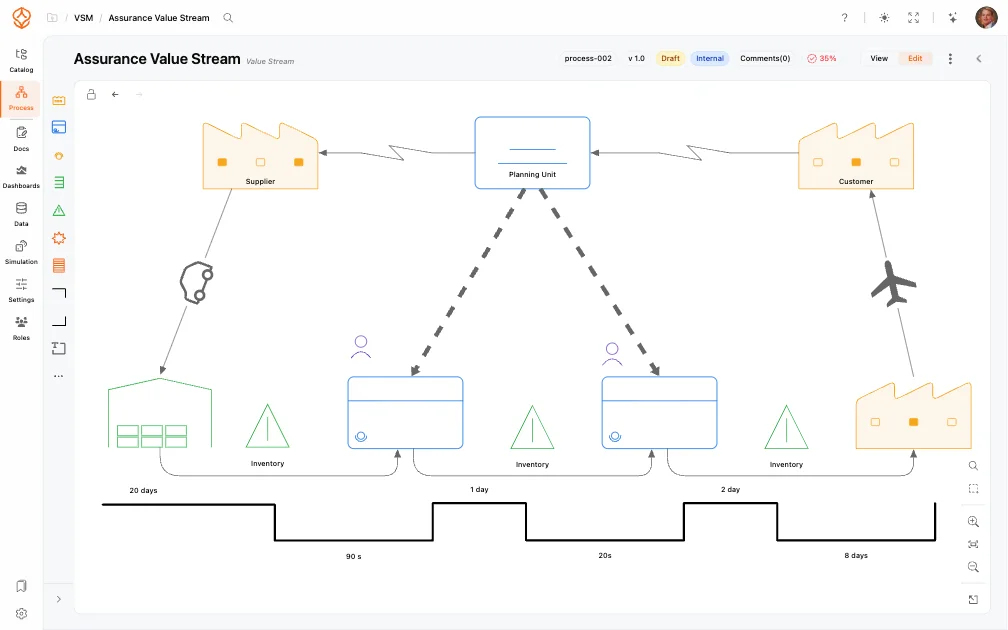
Five steps, and the output of each one stays in the same workspace.
From a value stream to a tested future state
Choose one value stream
Start with the stream the business feels: order to delivery, lead to cash, hire to retire. Agree where it starts and ends before drawing anything.
Map the current state
Add the steps, the inventory between them and the information flows that release the work. Keep the detail in the linked BPMN processes, not on the map itself.
Measure time and flow
Record process time, wait time, uptime and %C&A per step. The map then gives lead time, rolled throughput yield and the share of time that adds value.
Design the future state
Model the changes you intend to make as a separate version: fewer hand-offs, different approval rules, an automated step, more capacity at the constraint.
Simulate and compare
Run the future state through the digital twin and put the result next to the baseline. Take the option with the better payback into the improvement backlog.
A value stream map is only useful when it stays true. Here it is connected to the processes, owners and data around it.
Why map the value stream in ProcessMind?
What you can put on the map
The spreadsheet is a good first hour. The map is what has to survive the next two quarters.
Value stream mapping in a spreadsheet or in ProcessMind
A file per value stream, copied for every revision
The map in the meeting is rarely the map in the drive six months later.
One current version with history, comparison and review
The future state is a version, so the current state and the plan stay distinguishable.
A file per value stream, copied for every revision
The map in the meeting is rarely the map in the drive six months later.
One current version with history, comparison and review
The future state is a version, so the current state and the plan stay distinguishable.
Time and %C&A typed in by hand
Every recalculation is a manual formula that someone can break.
Recorded per step, rolled up automatically
Lead time, rolled throughput yield and value-added ratio come from the same rows the team edits.
Time and %C&A typed in by hand
Every recalculation is a manual formula that someone can break.
Recorded per step, rolled up automatically
Lead time, rolled throughput yield and value-added ratio come from the same rows the team edits.
Detail lives in another file or another tool
The map says what happens; the detail is somewhere else.
Each box links to its BPMN subprocess
The overview and the detail are the same model at two depths.
Detail lives in another file or another tool
The map says what happens; the detail is somewhere else.
Each box links to its BPMN subprocess
The overview and the detail are the same model at two depths.
No owner after the workshop
Improvements stall when nobody is accountable for the stream.
RACI ownership and review cadence on the map
Ownership is assigned where the stream is published, not in a separate matrix.
No owner after the workshop
Improvements stall when nobody is accountable for the stream.
RACI ownership and review cadence on the map
Ownership is assigned where the stream is published, not in a separate matrix.
The future state is a drawing
The benefit is an estimate defended in the meeting.
The future state can be simulated
Capacity and rule changes get a predicted cycle time before the rollout.
The future state is a drawing
The benefit is an estimate defended in the meeting.
The future state can be simulated
Capacity and rule changes get a predicted cycle time before the rollout.
Download the value stream map template
A CSV with the columns a value stream map needs: owner, process time, wait time, uptime, complete-and-accurate percentage and system. It rolls the lead time and %C&A up for you.
Opens in Excel, Google Sheets or Numbers. No account required.
Value stream mapping questions
Review your value stream with a specialist
Bring the stream you want to improve and the numbers you already have. We will map the current state with you and show how the future state is simulated, in one 30-minute session.
Prefer email? Contact us and we will reply within one business day.
Not ready to talk? Calculate your case with the free ROI calculator first.
Prefer to talk first?
Pick a slot with a specialist. The calendar opens in a popup, no form in between.
30 minutes with a specialist.
Start with the value stream you already know
Map the current state, put real times behind it and simulate one change before the next steering meeting. Start your free 14-day trial with no credit card required.