
What Is Process Mapping? Meaning, Types, and Benefits
Learn the meaning of process mapping, explore common methods and examples, and see how Process Mapping and Process Mining improve business processes.

The complete guide to BPMN 2.0: elements, benefits, and use cases
Complex business processes are difficult to manage. You may need to coordinate multiple tasks, track every step, and keep operations running smoothly. Business Process Model and Notation (BPMN) 2.0 helps you visualize, understand, and simplify business process management. By mapping your workflows, you can identify inefficiencies, optimize processes, and improve operational efficiency.
Describe your business process in plain text and our AI will generate a complete BPMN model tailored to your workflow, ready to edit, simulate, and share.
What is BPMN 2.0? BPMN 2.0 is a universal language for mapping business processes. Created and maintained by the Object Management Group (OMG), it provides a standardized notation for clear, consistent business process diagrams. Because BPMN 2.0 is vendor-neutral, you can use any software and still ensure that others can understand and interpret your BPMN 2.0 diagram.
Our SaaS process insights product uses BPMN 2.0 to bring process mining, design, and simulation together. With this software, you can monitor, evaluate, and improve your workflows to increase efficiency and productivity.
BPMN 2.0 offers several benefits for business process management. Here are a few:
Think of a BPMN 2.0 diagram as a blueprint for your business process, built from a set of basic elements:
BPMN uses four element types to map a business process:
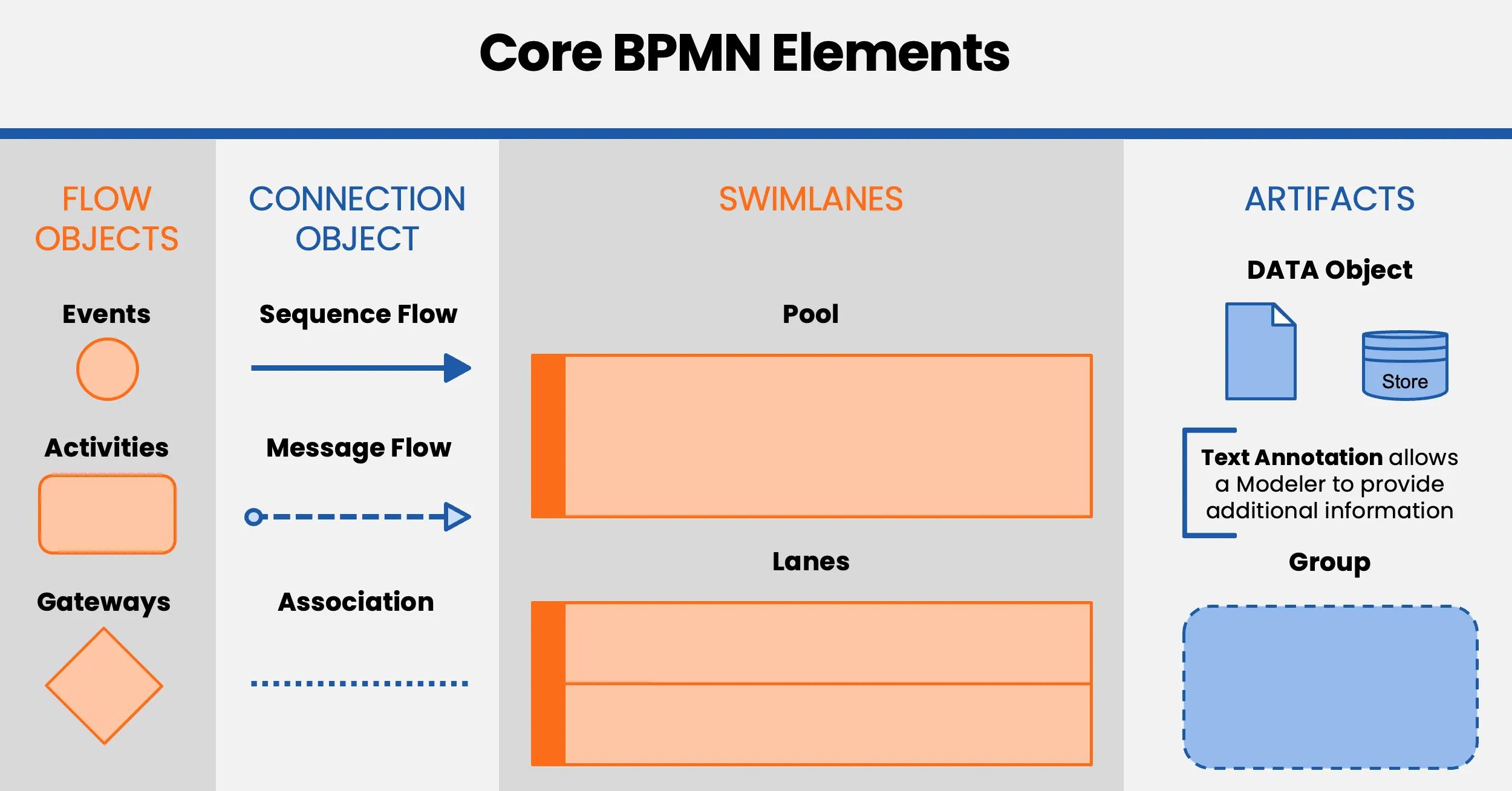
Let’s look at each element and its role.
Events trigger, change, or complete a business process. They appear as circles with symbols inside. Each symbol represents a specific event type:

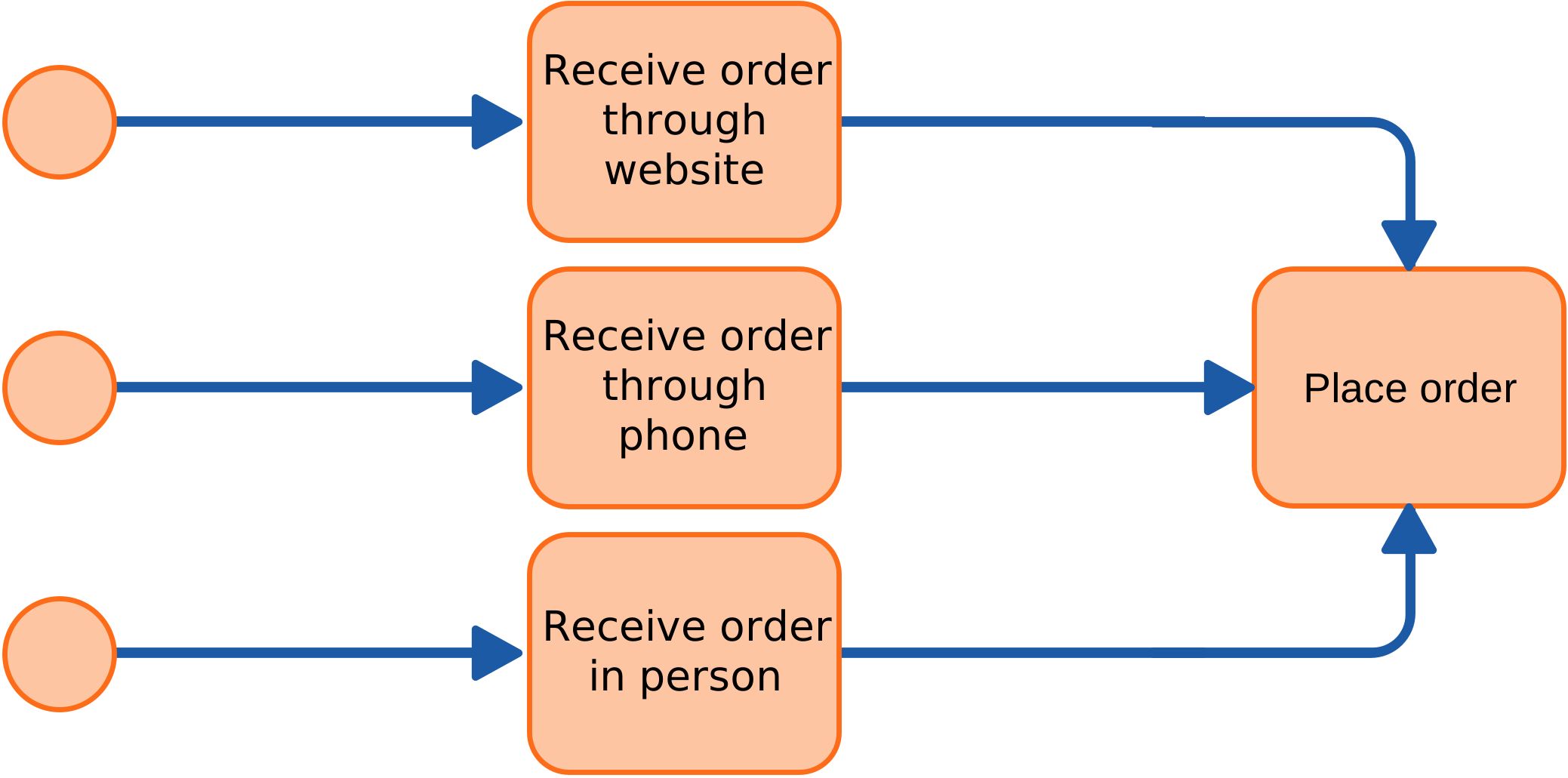
A BPMN diagram can include multiple start events. Only the events connected to the relevant start event are activated. For example, an order placement process may depend on how the order arrives: through the website, by phone, or through an in-person submission. The corresponding start event initiates the process.
An end event marks the conclusion of a process after all required steps in the diagram are complete. A process may have multiple outcomes, such as success or failure, so you can use multiple end events to show different results. For example, a successfully processed order ends with a successful event, while incorrect card details that cause a transaction failure result in an unsuccessful order.
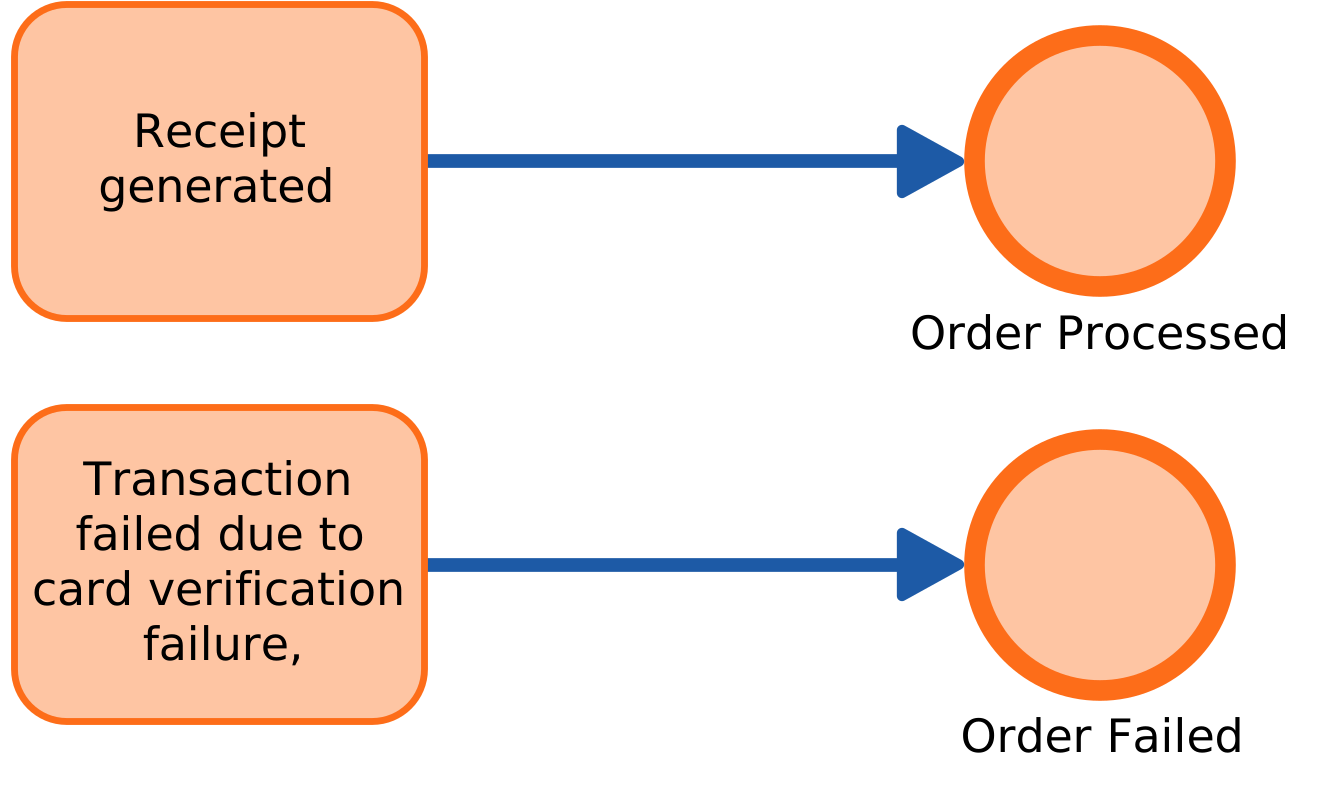
This example shows how end events can represent different outcomes. Give each end event a distinct name to avoid confusion.
An intermediate event occurs between the start and end points of a process. It can receive or send (“throw”) information. The connecting elements in the diagram show whether the event catches or throws information.

In the diagram, receiving a message starts the process. Subsequent tasks check item availability. Once the item is available, an intermediate event sends a confirmation link. Order processing continues only after the confirmation link is received, ending with the order’s completion (end event).
Intermediate events can use different trigger symbols that affect event flow. Triggers include messages, timers, errors, compensations, conditional flows, signals, multiple events, escalations, and parallel processes. Each represents a specific interaction or condition.
| Start | Intermediate | End | ||||||
|---|---|---|---|---|---|---|---|---|
| Type | Normal | Event Sub process | Event Sub process non-interrupt | Catch | Boundary | Boundary non-interrupt | Throw | |
| None | | |||||||
| Message | | | | | | | | |
| Timer | | | | | | | ||
| Conditional | | | | | | | ||
| Link | | | | |||||
| Signal | | | | | | | | |
| Error | | | | |||||
| Escalation | | | | | | | ||
| Termination | | |||||||
| Compensation | | | | | ||||
| Cancel | | | ||||||
| Multiple | | | | | | | | |
| Multiple Parallel | | | | | | | ||
In BPMN, activities represent the tasks you need to complete within a process, such as verifying an order or shipping a product. You can add markers to show repeated actions, such as loops.
You categorize tasks by the participant involved and the objects they use, consume, or generate during the process.
Generic Task

A generic task is a basic task type in your process model. You can add it quickly and refine it later into a specific subtype.
Manual Task
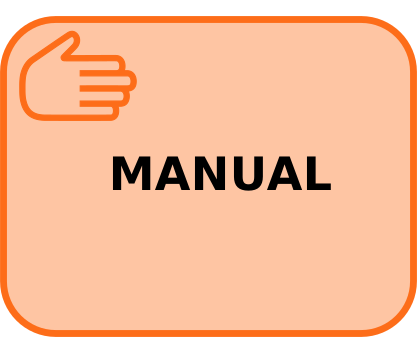
Individuals perform manual tasks without direct interaction with a process engine. Examples include organizing documents, resolving invoice issues by phone, and helping customers at service counters.
User Task

Individuals perform User Tasks, which a process engine assigns directly to each person’s task queue. After the task is complete, the engine requires confirmation, often through data entry or a button click. User Tasks are a core part of Human Workflow Management systems.
Examples include reviewing invoices, approving vacation requests, and handling support tickets.
Receive Task

Receive Tasks model the receipt of a message as a distinct task in the process flow. They provide an alternative to a message-catching event and are represented in BPMN 2.0 by an empty envelope symbol.
Receive Task (Instantiating)

An instantiating Receive Task has a small event icon in its upper-left corner. It starts a process as an alternative to a message start event.
Send Task

The process engine executes Send Tasks to call web services asynchronously through message queues and handle technical tasks.
Script Task

The process engine executes Script Tasks directly. You must write them in a language the engine can interpret.
Service Task

Service Tasks are operations performed by software applications and executed automatically as part of the process workflow. BPMN typically assumes that web services deliver these functions, although you can use other implementations. Service Tasks support process-oriented integration and align closely with the principles of Service-Oriented Architecture (SOA).
Business Rule Task

Introduced in BPMN 2.0, Business Rule Tasks apply specific rules within a process.
Other important activity types include collapsed Subprocesses, multi-instance Tasks, and AdHoc Subprocesses. They help you represent complex process behavior clearly.


Collapsed Subprocess
A collapsed Subprocess groups a series of Tasks within the larger process to keep the diagram clear. It represents those steps as a single element, while a separate expanded view shows the details elsewhere in the diagram.
AdHoc Subprocess
AdHoc Subprocesses have no predefined execution order. You can perform the Tasks in any order or skip them, depending on the process requirements.
Loop Task
Loop Tasks repeat in a cycle, similar to a “do while” loop in programming. The Task or Subprocess runs once before the engine evaluates the exit condition. If the condition is not met, the activity runs again. Once the condition is met, the process continues to the next activities.
Multi-instance
A multi-instance activity repeats a Task for a defined number of objects or items. It works like a for-each loop: the Task or Subprocess runs once for every item in a collection. Each item has its own instance, and the activity finishes only after all instances are complete. Vertical lines show that the items run concurrently, or in parallel. Horizontal lines show that the items run one after another, or sequentially.
Compensation
Compensation Tasks handle compensation events in a workflow. You always connect them to the process diagram with Associations, not Sequence Flows.
Compensation Combined
You can combine Compensation Tasks with loops and multiple instances. In these cases, the compensation marker appears beside the loop or multi-instance marker. You can also combine Compensation Tasks with any Task type described above. This supports scenarios such as a Manual Task that repeats until successful or a Task that runs repeatedly in parallel whenever possible.
Gateways are decision points that direct process flow based on conditions or events. In BPMN diagrams, they appear as diamonds. Common types include inclusive, exclusive, parallel, and complex Gateways. Gateways can also use data or event triggers.
 Exclusive Gateway
 Inclusive Gateway
 Parallel Gateway
 Event Gateway
Exclusive Gateway
An Exclusive Gateway appears as a diamond, with or without an “X” inside. It directs the process flow to exactly one possible output path.
Inclusive Gateway
An Inclusive Gateway appears as a diamond with a circle inside. It can split the process flow into multiple branches at the same time. The process must complete every activated path before the paths merge at a subsequent Gateway.
Parallel Gateway
A Parallel Gateway appears as a diamond with a plus (“+”) sign inside. When it splits the flow, it activates every outgoing path at once. When paths converge, it waits for every incoming branch to complete before continuing.
Event Gateway
An Event Gateway appears as a diamond with a double-bordered circle containing a pentagon. It represents an event-based decision point and directs the workflow based on the first event or Task to occur, such as receiving a message.
 Sequence Flow
 Message Flow
 Association
Connecting Objects show how elements relate within a process. BPMN defines three connector types: Sequence Flow, Message Flow, and Association.
Sequence Flow
Sequence Flow shows the order in which Tasks run. It appears as a straight line with an arrowhead and can represent a conditional or default path.
Message Flow
Message Flow shows communication between different Pools or organizational boundaries, such as departments. You cannot use it to connect Events or Activities within the same Pool. It appears as a dashed line that starts with a circle and ends with an open arrowhead.
Association
Association uses dotted lines to connect Activities and Artifacts. It adds context without changing the process sequence.

Pools represent major participant groups in a process, such as companies or departments. Swimlanes within a Pool organize Activities by role or responsibility, creating what you may call a swimlane process map. A Swimlane can also represent a system, not just a department or role.

In BPMN 2.0, a collapsed pool represents an external participant or entity while hiding its internal processes and Activities. A Pool typically represents a participant, such as an organization, department, or system.
Collapsed Pool: The Pool shows only its outline, while its internal Tasks and Activities remain hidden. This is useful when you need to acknowledge a participant’s involvement without showing its internal details.
Use Case: Use a collapsed Pool to show interactions between multiple participants without detailing the internal processes of every participant in your diagram.
A collapsed Pool in BPMN 2.0 is useful when you want to focus on interactions between participants rather than the details of each participant’s Tasks.
Artifacts add context to BPMN diagrams. They include Data Objects, Groups, and Text Annotations that help you understand the process and its participants.
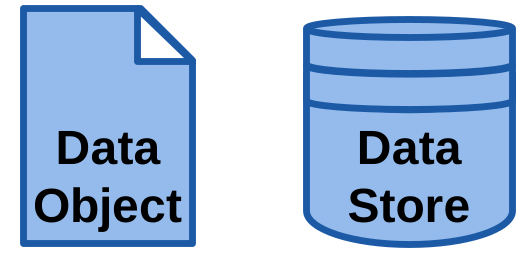
Data Objects define the information required by a process Activity. A data store provides a repository for collecting or storing information and preserves it after the process ends. You can also distinguish between Data Input, which describes required data, and Data Output, which documents generated data.
Group

A Group logically categorizes Activities to make the diagram easier to understand without changing its flow.
Text Annotation

Text Annotations add explanations or context to specific parts of a diagram, making its components easier to understand.
BPMN centers on the concept of a process. To create a BPMN diagram, start by outlining the process in simple steps. Then add detail as you refine the model.
Here’s a beginner-friendly, step-by-step guide to creating a BPMN diagram:
Identify Essential Steps: Start by identifying the core steps, along with the start and end points. For example, when a customer places an order, identify key actions such as receiving the order, verifying credit, fulfilling the order, and issuing an invoice.
Explore Alternative Paths: Look for alternative routes that may lead to different outcomes, such as order completion. Add Gateways to represent these alternative processes and directions.
Implement Pools and Swimlanes: Identify the key stakeholders, departments, and roles in each entity. Organize their Activities into Pools and Swimlanes to show responsibilities clearly.
Facilitate Message Communication: Add any required Message exchanges between different Pools or within the same Pool to support the flow of information.
Add Artifacts and Details: Add relevant Artifacts, including documents and actor roles. Break complex Tasks into Subprocesses.
Address Errors: Finally, identify potential errors and add mechanisms to manage them within the process.
Describe your business process in plain text and our AI will generate a complete BPMN model tailored to your workflow, ready to edit, simulate, and share.
By understanding these core elements and how they interact, you can create a BPMN model that captures the key details of your BPMN business processes.
BPMN 2.0 helps you design, document, and manage any BPMN workflow. Its standardized visual modeling approach improves communication, clarity, and operational efficiency.
Explore BPMN 2.0 further to see how it can support your organization. You can find many resources online, including the official BPMN website, to help you get started.
ProcessMind combines process mining, design, and simulation to improve business process management. Use our software to monitor, analyze, and optimize workflows, increasing efficiency and productivity.
Knowing the symbols is one thing; building a model people can actually read is another. These habits keep a model useful long after the workshop that produced it.
Define the scope before you draw. Decide up front what the model is for — improvement, automation, or documentation — because that decides the level of detail. Model one process or subprocess at a time, and expand only when it earns its keep. Involve the people who do the work early: they catch the steps that never made it into the process description.
Work top-down. Start with a high-level overview that shows the main stages, then break the stages that matter into subprocesses. A reader should be able to stop at any level and still understand the story.
Use the standard, then stay consistent. Use the correct BPMN 2.0 symbols rather than inventing your own conventions, and name elements the way the business names them. Consistent naming and layout is what makes a model navigable months later.
Organize with pools and lanes. Pools separate participants; lanes separate roles within a participant. If every task lands in the same lane, the lane adds nothing — split them where responsibility actually changes hands.
Keep it simple. Subprocesses and reusable tasks beat a 200-element wall. If a model needs a legend to be read, the model is the problem.
Validate the model. Walk the flow with the people who run it, run a what-if simulation to check that it behaves as expected, and — once the model is mapped to data — let its own numbers show where reality disagrees.
Maintain it. Models age. Review them when the process changes, keep versions of meaningful states so you can compare before and after, and archive what you no longer use instead of leaving it half-updated.
ProcessMind supports these habits directly: the canvas, auto-layout, and version history are described under Modeling.
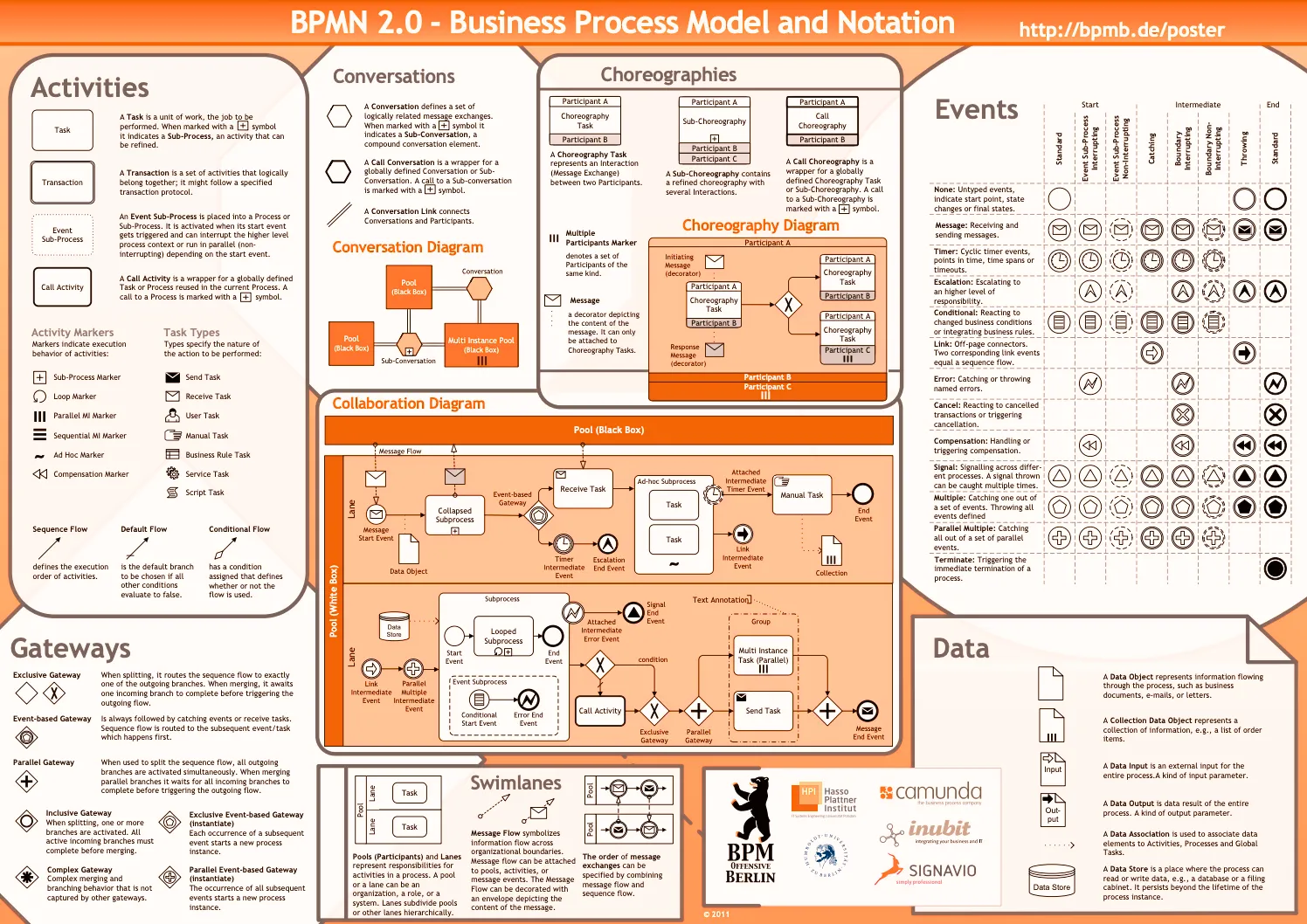
Access BPMN 2.0 resources in multiple languages to help you improve your business processes. Choose your preferred language below:
 English
 Dutch
Dutch German
 French
 Español
 RussianSwedish
 Italian
 Portuguese
 Polish
 Hebrew
 Ukrainian
 Chinese
 Hungarian
 Persian
 English
This poster was created in 2010 and translated by researchers and practitioners around the world. We thank the institutions and people who supported this initiative and made it possible to share the poster with you.
In particular, we thank the following people and institutions:
Original Authors: Gero Decker, Jakob Freund, Alexander Lübbe, Jan Mendling, Frank Puhlmann, Torben Schreiter, Matthias Weidlich
Translations provided by the following people/organisations: French: Trisotech; Spanish: Ildefonso Montero, Luciano García-Bañuelos, Marlon Dumas; Russian: Business Process Technology Group at Hasso-Plattner-Institute; Swedish: Birger Andersson and Petia Wohed; Dutch: Thauris.nl; Portuguese: Lucinéia Heloisa Thom, Cirano Iochpe, Polish: MGX Infoservice; Hebrew: Ofir Nimitz and Iftah Peretz; Ukrainian: Oleksandr Maistrenko and Artem Polyvyanyy; Chinese: A/Prof Zhang and Lecturer Ms Bai from School of Software Engineering in Beijing Jiaotong University; Hungarian: Istvan Gerecs; Persian: Hamidreza Sarabadani.
Source: the BPMN 2.0 poster
Learn the meaning of process mapping, explore common methods and examples, and see how Process Mapping and Process Mining improve business processes.
Learn the DMAIC process, Six Sigma process, and lean process improvement tools to deliver measurable business results.
Compare Celonis process mining with ProcessMind to find software that fits your processes, budget, and goals.
Compare Fluxicon Disco and ProcessMind on features, pricing, and use cases to choose the right process mining platform for your team.
Get instant access with no credit card and no waiting. Turn the way your organization works into clear, connected process designs.
Build your process architecture, define ownership and controls, and align roles and responsibilities across every level.
Start your free trial and create one reliable foundation for governing, managing, and continuously improving your processes.
We use cookies to improve your experience, personalize content, and analyze traffic. By clicking "Accept All," you consent to our use of cookies.