


What Is a BPMS? Business Process Management, Explained
A BPMS models and executes defined processes. See its five parts, where it stops, and why process knowledge matters more than execution.

A BPMS, or business process management system, is software that models and executes defined processes, then monitors the work it runs. It is strong at execution: it enforces a sequence, assigns tasks and records what happened. It is weak at the bigger picture, because it can only execute and report on the part of the work you hand to it.
This guide explains what a BPMS does, the five parts you are really buying, and where it stops. It then compares execution software with process intelligence, which deliberately leaves execution to the many systems that already do it well and instead connects their data into one place your people and your AI can use.
What does BPMS mean?
BPMS stands for Business Process Management System. Some vendors use Business Process Management Suite instead. In either case, the category covers software for defining a process, routing work through it and monitoring its execution.
BPM, or business process management, is the discipline of understanding, designing, measuring and improving how work gets done. A BPMS is one type of software that can support that discipline. You can practise BPM without buying a BPMS, and buying a BPMS does not guarantee that you are managing processes well.
The category has changed over time. It began with workflow engines, grew into suites that added modeling, forms and monitoring, and now includes low-code platforms where teams assemble whole process applications. That variety is why two vendors describe a BPMS differently. When you evaluate business process management software, ignore the label and ask the four questions that matter: does it model the process, execute it, connect to the other systems involved, and show how its instances are running?
What are the five parts of a BPMS?
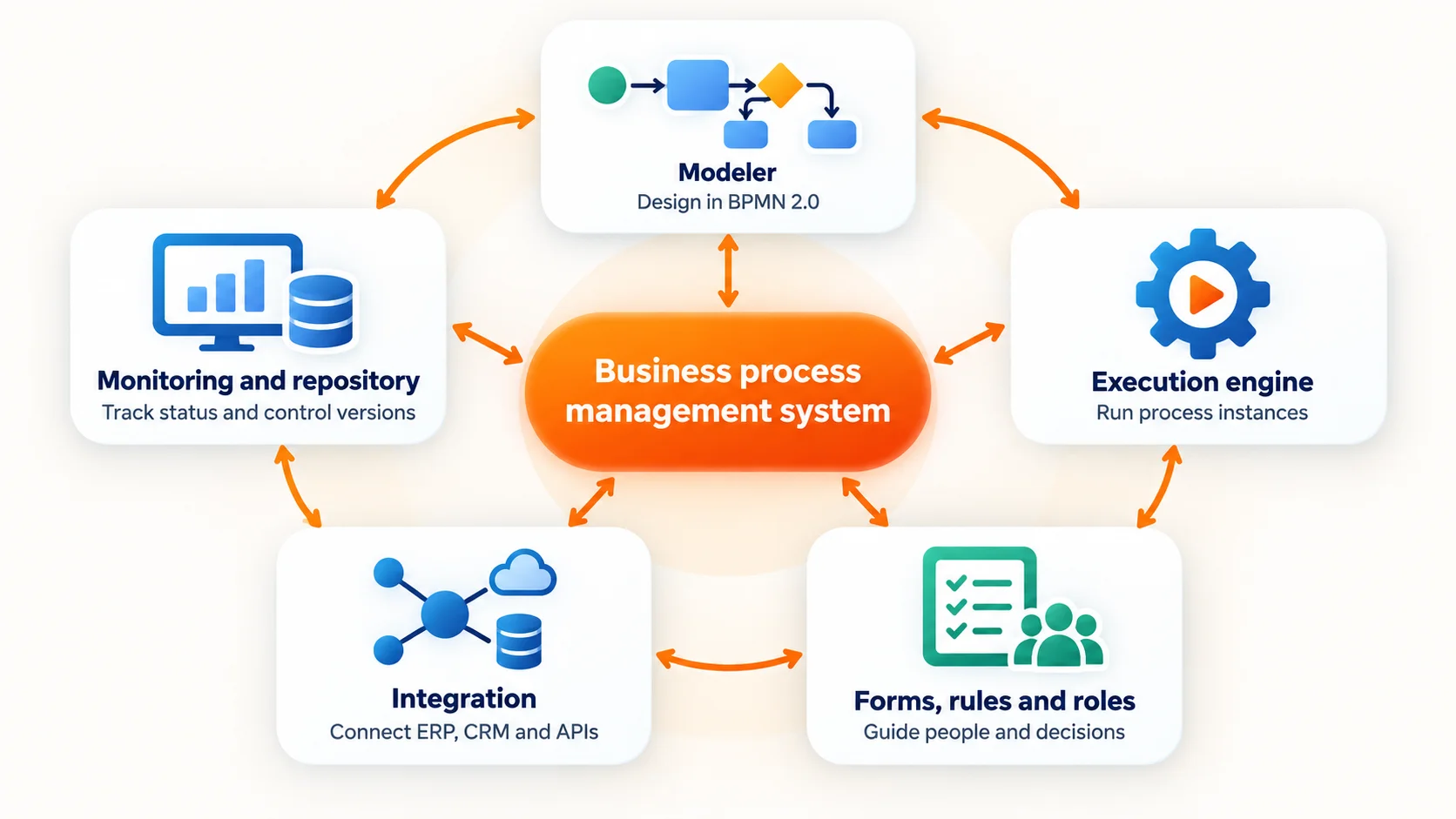
Products package these capabilities in different ways, but a business process management system typically includes five parts:
- A modeler. You define the process, often in BPMN 2.0. A model can describe the flow and, in an executable system, provide the basis for running it. See the BPMN modeler to learn more about designing process models.
- An execution engine. The engine creates process instances, evaluates conditions, assigns tasks, starts timers and escalates overdue work.
- Forms, rules and roles. These determine what information people provide, which tasks they see and what rules govern the next step.
- Integration. The system exchanges data with applications such as ERP and CRM systems, data warehouses and API gateways. The integration work can be a significant part of implementation.
- Monitoring and a repository. Dashboards show the status of running instances. A repository helps you manage process versions and control changes.
A workflow engine is one part of this picture. A BPMS brings the engine together with the tools and controls needed to define, support and monitor a broader process.
What does a BPMS do that a process document cannot?
A process document describes how work should happen. A BPMS can route and track work according to configured rules. For example, it can:
- Escalate a task that has been waiting for a set period.
- Route an instance for approval when it meets a configured threshold.
- Record the path taken by each instance.
- Let you update a flow through configuration rather than changing several surrounding applications.
These capabilities are useful when you need consistent routing, clear ownership and visibility into the instances the system runs. They do not guarantee that every part of the real process happens inside the BPMS. If your main need is to document a process or understand how it currently works, execution software may not be the right first step.
How do BPMS, workflow engines, RPA, process mining and process intelligence differ?
These five technologies address different parts of process management. The table below shows what each one does and the question it helps you answer.
| Technology | Executes work | Observes work | Changes the process | Typical question |
|---|---|---|---|---|
| Workflow engine | Yes | Partly, for the flow it runs | Yes, for a defined flow | How do I move this case from one step to the next? |
| BPMS | Yes | Yes, for the instances it runs | Yes | How do I run and manage this process? |
| RPA | Yes, by mimicking a person at a user interface | No | No, it automates steps in the existing process | How can I automate a repetitive manual step? |
| Process mining | No | Yes, using event logs | No, it informs process changes | What is happening in practice, and where does it differ from the expected flow? |
| Process intelligence | No, it leaves execution to the executor | Yes, across every system that keeps a record | No, it informs the change and keeps the model current | How does the whole process run across our systems, and where does the model no longer match? |
RPA and a BPMS approach process change differently. RPA automates tasks in the existing process. A BPMS runs a process you have defined, which may change how work is routed. Before automating a task, check whether a process redesign would remove it. Learn more about finding automation opportunities with process mining.
Process mining and a BPMS also answer different questions. Process mining analyzes event data to show how work actually moves through your systems. A BPMS executes a designed flow and reports on the instances it handles. That distinction matters when you need to check whether the model matches the work.
Process intelligence is the last row, and it is the one that connects the others. It leaves execution to whichever system does it best, reads the record from every system, and keeps one model of the process that all of them are measured against. A BPMS reports on its own instances; process intelligence reports on the process, including the work no single platform runs.
Why can one BPMS not run every process?
A BPMS sounds like the answer to process management until you count the systems it does not own. A real process crosses an ERP, a CRM, a ticketing tool, a supplier portal, a spreadsheet and a few inboxes. The platform runs the part you modelled inside it, and the rest of the work carries on elsewhere.
That gap has three consequences worth knowing before you buy.
You generate custom workflows instead of reusing standards. A BPMS is a toolkit, so every process becomes a project: you model your own variant, name your own steps and maintain your own version of a flow that thousands of other organizations also run. Industry-standard reference models for order-to-cash, purchase-to-pay or incident management get rebuilt inside each platform rather than reused, and two departments on the same system can end up with two different versions of the same process.
Execution-first platforms forget the bigger picture. A BPMS is judged by what it runs, so attention and budget go to the flows inside it. The processes it does not run, the ones crossing teams, systems and countries, are often the ones nobody owns. Making what executes faster is not the same as understanding how the organization works.
A BPMS will always be limited, and it grows its own exceptions. Every process has exceptions: the urgent order, the VIP customer, the supplier who only accepts email. Inside a BPMS each exception becomes another configured branch, another form, another integration and another workflow to maintain. The platform that promised to standardise work slowly fills with special cases that only its own team understands.
None of that makes a BPMS a bad tool. It makes it a poor single source of truth about your processes.
The gap is widest in IT business process management, where one piece of work spans a ticket queue, a change calendar and several applications, and no single business process software sees all three.
Which process questions should you ask first?
Before you choose a BPMS, a workflow engine or a measurement platform, agree on what you need to know about the process itself.
- Which systems record a step in this process, and which steps leave no record anywhere?
- Where does work wait, and where does it change hands between teams?
- Which variations happen often, and what causes them?
- Which steps need human judgment, and which only exist because two systems do not connect?
These are questions about the process rather than about a product, so most of them can be answered from records your systems already hold and from the people doing the work.
They also show how much of the process a BPMS would actually own. If three of the five systems sit outside the platform, it will run part of the work well and report on the rest of it badly. What is process mining explains how to reconstruct those paths from event data instead.
Should you keep a BPMS you barely use?
Many organizations bought a BPMS for its execution engine and never used it. The rollout took longer than planned, the first flows were configured by a partner, and the business kept working in the systems it already had. What remains is a licensed modeller that a handful of people open to draw diagrams, and a maintenance bill for a runtime nobody starts.
That is the moment to separate the two jobs the platform bundled together. The workflow engine was meant to execute work; the model repository was meant to hold process knowledge. If only the second job is happening, you are paying an execution platform to be a documentation tool, which is a heavy, technical and expensive way to document.
Is your BPMS doing a job it was not bought for?
- The workflow engine has not run a process in production this year.
- The models are kept by one team, and nobody outside it reads them.
- Every change to a diagram travels with the runtime, so documentation waits for a release.
- The processes you most need to understand cross systems the platform does not connect.
- The licence is renewed for the modelling features, not for the execution.
If most of those are true, the execution platform is being asked to do a knowledge job it was never designed for. The fix is not more runtime. It is to move the knowledge into a tool whose whole job is the hub: one place for every process, connected to the data from every system, readable by the people and the AI assistants that need it, with no runtime to operate.
Keep the BPMS for the processes it genuinely executes. Move the process knowledge somewhere it can grow without a release cycle.
How is process intelligence different from a BPMS?
A BPMS
- Runs a process you define, and enforces the sequence
- Builds a custom workflow for every process, inside one platform
- Reports on the instances the platform itself handles
- Keeps its models executable, so they serve the runtime
- Sees only the systems it has been integrated with
Process intelligence
- Leaves execution to whichever system does it best
- Connects the data from every system into one process model
- Shows how work really flows, including paths no system was designed to run
- Keeps process knowledge in one place for people and AI to use
- Grounds every model in mined reality instead of a workshop's memory
The difference is deliberate rather than a missing feature. Process intelligence leaves execution out because there are many executors, and the best one is rarely the platform you happen to own. RPA, AI agents, a workflow management system, the ERP’s own workflows and the teams who simply do the work each win in a different corner, and the tool that runs work should be chosen for that job alone.
What cannot be left to five systems is the knowledge. If every executor keeps its own map of the process, nobody can say what the process is, which variation a customer actually received, or which step to automate next. Centralising process knowledge, for the people who run the work and for the AI assistants now being pointed at it, matters more than being the thing that runs the work.
That is where the data advantage sits. A BPMS reports on its own instances; a process intelligence platform connects the event data from every system, so the picture includes work the BPMS never saw. It can then hold the one model that the BPMS, the ERP and the automation tools are all measured against.
Why is process mining needed to ground the model in reality?
A BPMS can report on the instances that run inside it. That does not mean it captures every path people take to complete the process. Three common gaps can emerge:
- Work happens outside the engine. Someone handles an exception by email and updates the system later. The instance may look compliant even though the work took longer than the model suggests.
- The same outcome is reached through other systems. Teams may use an ERP system, spreadsheet or supplier portal. If that work never enters the BPMS, its dashboards cannot show the full process.
- The model falls behind. A process may be accurate when it is published, then drift as teams adopt local variations. If updating the model takes time, those variations can persist.
The result is a well-managed model that no longer reflects how people work. Process mining is what grounds it again: it reads the event data your systems already write and reconstructs the paths that actually ran, including the ones nobody modelled.
Conformance checking compares a process model with event data to show where execution and design diverge, while process mining shows the variants, delays and rework inside your own records. Why process modeling and process mining belong together explains why the two halves, what you intend and what happened, should never be separated.
Why did we decide not to build execution?
It is a fair question to put to a process platform: if you can model a process and see how it runs, why not execute it too? A BPMS exists because the obvious answer is yes. We took the other road, and it was a decision rather than an omission.
We chose not to build an execution engine because execution is a best-of-breed problem. RPA, AI agents, a workflow management system and the ERP’s own workflows each win in a different corner, and the team that runs the work should own the runtime. Our job is the umbrella above all of them: document the process, monitor it across systems, connect the data, and keep one model the whole organization can trust. We made that choice so nobody has to move their processes into our platform to understand them.
In practice that means ProcessMind never asks for the keys to the workflow. The systems you already run keep executing, and the knowledge about what they execute gets centralised and kept current. If you later replace an executor, an RPA bot with an AI agent or a legacy workflow with a new one, the model, the history and the measurements stay where they are. Why we created ProcessMind sets out the rest of that reasoning.
How does ProcessMind fit with a BPMS?
ProcessMind is not a BPMS and does not execute work. Your BPMS, ERP or automation platform stays responsible for running processes, and that is the point: keep the best executor for each process, and put the knowledge about all of them in one place.
| BPMS | Workflow engine | RPA | Process mining | Process intelligence | |
|---|---|---|---|---|---|
| Changes | Process design and execution | Task routing and approvals | User-interface work | Visibility into actual flow | Decisions and improvement |
| Needs as input | Models, rules, forms and integrations | Workflow definitions and business rules | Stable repetitive tasks and screen access | Event logs with case IDs and timestamps | Event data, models, KPIs and context |
| Owned by | Process owners and operations | IT and workflow teams | Automation and RPA teams | Process analysts and data teams | Operations and transformation leaders |
That is what process intelligence does in practice:
- Before you build: Mine the event data from the systems involved to see the real paths, variants and exceptions. Model the target process in BPMN 2.0, then use process simulation to test a change before anyone configures a workflow.
- After you build: Keep mining to see whether execution still matches the design, and where a local workaround has quietly become the process everyone follows.
The BPMS runs the work. Process intelligence decides what is worth running, and checks whether the result matches the process people actually follow.
When should you choose a BPMS, RPA or process intelligence?
The right starting point depends on what you already know and what problem you are solving.
Start with process intelligence when:
- People disagree about how the process works today.
- The process crosses several systems, and part of the work may happen outside the main workflow.
- You know the process is slow but not why.
- You own a BPMS whose workflow engine sits idle and want the process knowledge kept somewhere useful.
Consider a BPMS when:
- The process is understood and stable enough to standardise.
- Work crosses teams, and hand-offs need clearer routing or ownership.
- You need to enforce rules and manage changes without touching several applications at once.
Consider RPA when:
- The process is stable and repetitive.
- The task happens often enough to justify automation.
- The applications cannot be changed, and the step can be automated through their interfaces.
Two habits keep the order right: measure the process before you buy execution software, and check whether a redesign would remove the task before you automate it.
How can you evaluate a BPMS before you buy?
Start with one process that has a clear name and an owner: order-to-cash, purchase-to-pay, onboarding, incident handling. Avoid evaluating a broad area such as “operations” without saying which process you mean. Then work through four steps.
-
Find the event data
Check which systems record the process, and whether their records carry a case identifier, an activity and a timestamp. Business process management tools describe the flow you intend; the event log is what proves it ran.
-
Compare the design with what executed
Look for the paths, delays and exceptions the model does not show. Putting the best BPMS candidate on your own data is more useful than a feature table, because it shows which parts of the process it would actually own.
-
Decide what the evidence points to
It may be a BPMS, a process redesign, one changed step, or nothing at all. Let the finding choose the tool rather than the other way round.
-
Keep measuring after you build
The platform can report on the tasks it runs. Event data from across your systems shows whether the process still matches the work once the workflow is live.
If the process crosses systems the BPMS does not connect, the first measurements will make that visible. That is the comparison worth buying execution on.
Where to Go From Here
You have the category clear and a way to separate execution from knowledge. The next move is to see the process your own systems already describe.